
I’ve spent years watching search results shift from day to day. Those little changes can make or break an SEO campaign.
When I realized how much time and money businesses waste chasing impossible rankings, I built a free tool that measures search result volatility. It helps me spot which keywords are worth pursuing and which ones would just drain a budget with no results.
With this SERP Volatility tool, I can target any location or device and see how stable or unstable rankings are. That kind of info tells me if a keyword really has potential or if big competitors have it locked down.
Understanding those patterns saves effort and keeps SEO strategies focused on opportunities that actually pay off.
Key Takeaways
- Predict keyword difficulty by studying ranking changes
- Use free data to focus SEO efforts on real opportunities
- Gain an advantage through clear, location-based analysis
Table of Contents
Understanding SERP Volatility
What SERP Volatility Means
When I talk about SERP volatility, I mean how often and how much search results change for a keyword. If a site jumps from position 1 to 18 and back, that SERP is unstable.
A steady ranking pattern shows strength, while big shifts mean weak competition.
| Pattern | Meaning |
|---|---|
| Stable results (positions 1–3 rarely move) | Strong search results, harder to rank |
| Frequent changes (top 10 positions fluctuate) | Moderate competition, possible opportunity |
| Large swings (sites move 10+ positions) | Weak results, easier to penetrate |
I run my tool across 10 separate checks. It shows which sites hold steady and which ones bounce around.
Why SERP Volatility Testing Matters For SEO
Knowing how volatile a SERP is helps me decide whether a keyword is worth chasing. If the top listings barely move, I know I’ll need more time and resources to compete.
But if rankings shift often, it’s a sign I can enter more easily and maybe start earning faster.
Quick checks I make before targeting a keyword:
- Opportunity score: Tells me if ranking will be simple or tough.
- Top directories: Shows which platforms (Yelp, Facebook, BBB) already drive visibility.
- Movement range: Helps me judge if the market is stable or open.
Benefits Of Analyzing SERP Volatility

Measuring Keyword Strength
When I study SERP volatility, I see how much rankings move for a keyword. A stable SERP with little movement usually means strong competition.
If the top results rarely shift, ranking there will take more time and resources. Frequent changes show a weaker SERP that’s easier to target.
| SERP Behavior | Level of Difficulty | Recommendation |
|---|---|---|
| Minimal rank changes | High | Requires strong SEO effort |
| Moderate fluctuation | Medium | Possible with a solid strategy |
| Frequent shifts | Low | Easier to rank and worth targeting |
Finding High-Value Gaps
By tracking volatility, I can spot keywords where major competitors aren’t holding steady. These gaps often point to spots where I can move in fast and scoop up some traffic.
I also notice helpful patterns - like directories or local listings showing up - so I can use those same platforms to bring in leads.
Quick tips:
- Look for directories appearing in results like Yelp or BBB.
- Use those same directories for extra exposure.
- Focus on positions moving between 5–30 for balanced opportunity.
Preventing Unnecessary Spending
Analyzing SERP volatility helps me avoid wasting money on tough keywords. If I see that only big, established sites hold the top spots and rankings hardly change, I know not to chase them.
I focus my budget on SERPs where I can actually rank and get results faster.
Example:
- A stable SERP = high cost, low return
- A volatile SERP = lower cost, faster wins
Overview Of The Free SERP Volatility Tool
Key Functions And Benefits
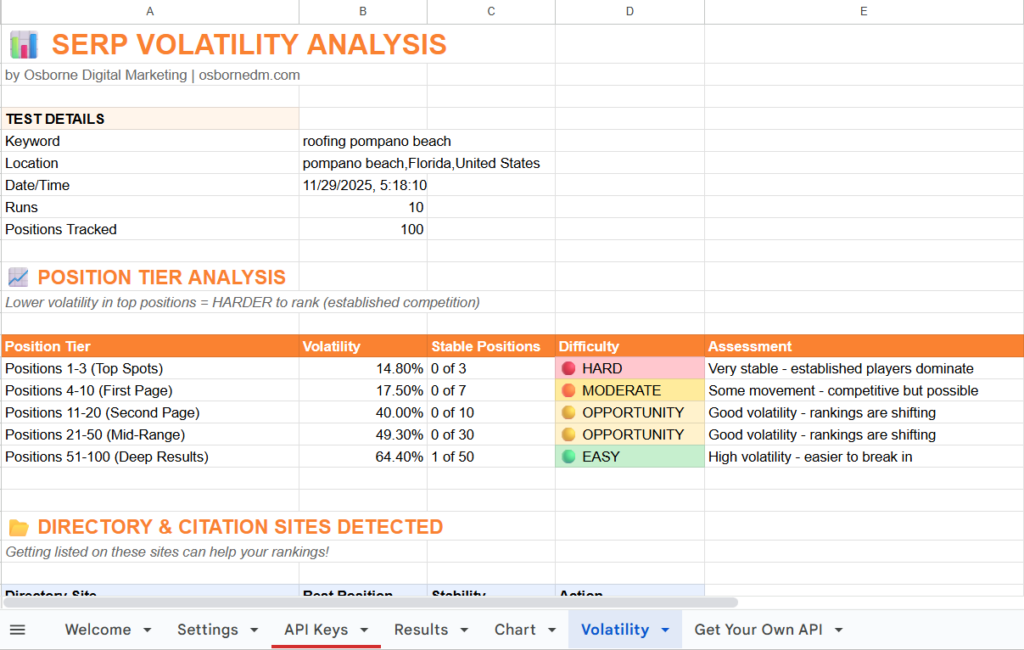
I built this free SERP volatility tool to help people test how unstable or stable a search result page is. It tracks ranking positions for up to 100 listings over multiple runs and shows how much those rankings change.
When a keyword’s results move a lot, that means there’s room to rank. If they barely move, it’s going to take more work and money to break in.
You can run tests for any city, state, or country, and choose between mobile or desktop results. The output includes details like ranking shifts, volatility patterns, and visible listings such as local directories.
This helps identify which types of listings create the real competition.
| Setting | Description |
|---|---|
| Location targeting | Test keywords in specific cities or countries |
| Device filter | Run checks for mobile or desktop users |
| Depth of analysis | Scans up to 100 results across 10 runs |
How It Compares To Other SERP Tools
I’ve used plenty of paid tools that claim to track volatility, but most just mash all the ranking data into one number. That can mislead users because it hides how individual results actually move.
My tool shows the full picture, from position 1 to 100, so you can see when a SERP is unstable or locked down by big players.
Paid versions often cost hundreds of dollars a month. They perform similar scans but charge for each query or report.
This free version gives you detailed rank tracking without cost, while keeping the data transparent and actually readable.
Comparison Snapshot
| Feature | Free SERP Volatility Tool | Common Paid Tools |
|---|---|---|
| Cost | Free | Expensive (hundreds per month) |
| Data transparency | Shows full ranking range | Condenses into one score |
| Local targeting | Yes | Often limited |
| Runs per test | 10 | Usually fewer |
Price And Ease Of Use
You can grab the tool straight from my website without paying anything. It connects through the DataForSEO API, which provides real ranking information.
New users can sign up through my referral link to get a small credit, which keeps the tool free to use.
Just enter the keyword, location, and device, then click Run Volatility Test. The tool handles the rest and spits out a chart and opportunity score.
This simple setup lets you figure out if ranking for that keyword makes financial sense before you spend money on a campaign.
How To Use The SERP Volatility Tool

Preparing Custom Search Settings
I start by setting my keyword, location, and device type. The tool lets me focus on any city, state, or country, so I can test a search that fits my market.
I usually format locations as City, State, Country for accurate results. I can also switch between desktop and mobile views to compare performance.
Quick Setup Checklist:
- Enter the target keyword
- Choose the location format correctly
- Pick desktop or mobile device
- Save settings before running the test
Conducting A Volatility Analysis
Once everything’s set, I click Run Volatility Test. The system runs about ten scans and tracks up to 100 ranking positions.
It takes about a minute for the tool to collect the data. I let it finish without refreshing the page so I get the full results.
Example Steps:
- Input keyword and location
- Confirm API setup and credits
- Click Run Volatility Test
- Wait for the dashboard to load the data
Reviewing And Understanding The Data
After the scan finishes, I look at how much each result shifts. If a domain moves between position 1 and 18, that tells me the search results aren’t stable and ranking might be easier.
Stable positions from 1 to 3 usually show strong competition.
I use a small table like this to review scores:
| Range (Positions) | Level of Movement | Ranking Potential |
|---|---|---|
| 1–3 | Very stable | Difficult |
| 4–10 | Moderate | Possible |
| 11–30 | High movement | Higher potential |
When I notice directories like Yelp or Facebook ranking, I list my business there to capture leads quickly. I also check the Opportunity Score (shown out of 100) to decide if targeting that keyword is worth my time and budget.
Actionable SEO Insights
Checking Rival Rankings In The SERP
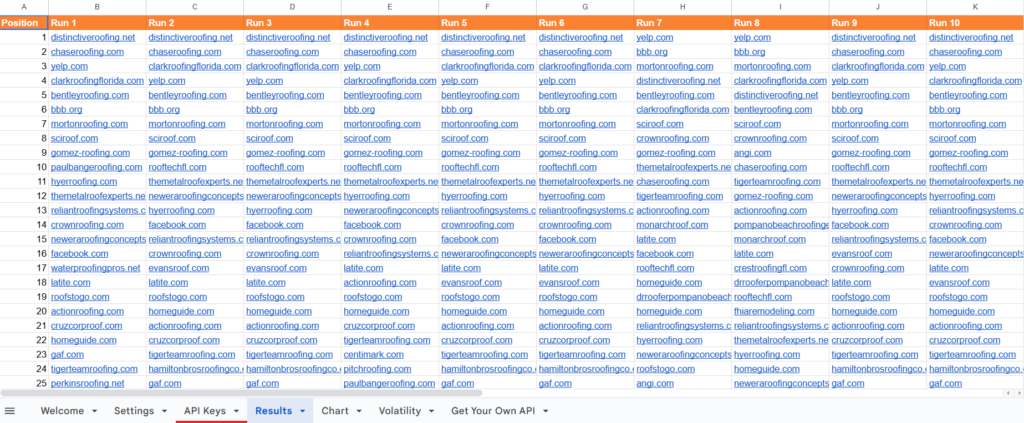
When I analyze a keyword, I start by running it through my SERP volatility tool. This tool tracks ranking shifts over ten runs and measures how stable or unstable the search results are.
If a site drops from position 1 to 18, that volatility tells me the search results are weak and open for competition. But if the same pages sit steady in the top 3, they’re likely hard to outrank.
I target local searches by setting the city, state, and country so the data actually reflects the environment I’m aiming to rank in.
| Rank Range | Volatility | Difficulty |
|---|---|---|
| 1–3 | Low | Hard to outrank |
| 4–10 | Moderate | Competitive |
| 11–30 | Higher | Possible opening |
Making Use Of Local Listings And References
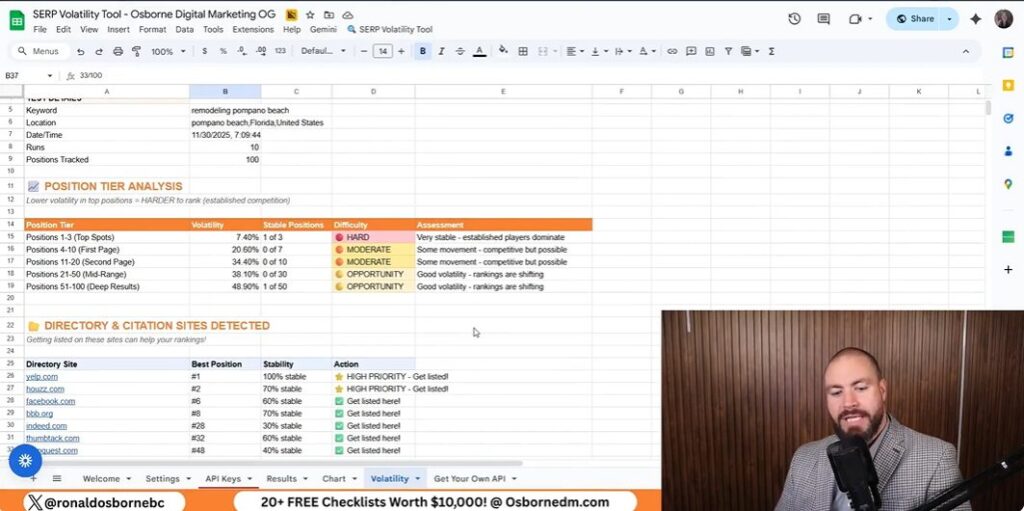
When I review search results, I usually spot directories like Yelp, Houzz, Facebook, and the Better Business Bureau right on the first page. If I see them, I don’t just scroll past - I add my client or business to those platforms.
These listings help pull in leads and build visibility, even if the main keyword feels impossible to rank for.
Consistent citations across top directories give search engines more trust signals. They also send indirect traffic that sometimes turns into real business.
Understanding The Opportunity Score
The opportunity score is my quick way to gauge if a keyword’s worth chasing. If a tool shows a score of 33 out of 100, I know it’ll take a lot of time and money to get anywhere.
Scores closer to 80–100 usually mean less competition and a better shot at ranking. I lean on this score to help me decide where to spend my energy - or when to just move on.
Accessing The SERP Volatility Tool
Getting The Tool From Osborne Digital Marketing
You can grab my SERP Volatility Tool straight from the Osborne Digital Marketing website. The link’s right on my page, and as soon as you open it, the tool’s ready to go. It’s totally free.
When you sign up, you’ll also unlock other handy SEO tools without paying a dime. All I ask is for a quick subscribe or a like - no strings attached.
Setting Up The API Connection
The tool works with the DataForSEO API. Here’s what you do:
- Click the DataForSEO link on the setup page.
- Create a free account there.
- Pop your API login details into the tool.
If you use my referral link, you’ll get $1 in credit - that covers the cost of this and other tools. Every account works the same, and that credit basically unlocks everything for free.
| Requirement | Description |
|---|---|
| API Provider | DataForSEO |
| Cost | Free with $1 credit |
| Access | Sign up through my referral link |
Finding More Free SEO Tools
After you grab the volatility tool, check out the other resources on my site. There are free tools like a Google Review Scraper and Client Finder.
These let you analyze your online visibility, manage client outreach, and spot new opportunities. No payment, no hassle - just download and start using them.
Getting The Most From SEO Tools
Smart Ways To Use These Tools
I use a free SERP volatility tool to track how search results shift up and down. If a ranking jumps from spot 1 to 18, I know the competition’s not that strong.
But if the top results barely budge, it’s probably going to be a grind to outrank them. When I test keywords, I check the volatility ranges to see where the best shot lies:
| Range | Competition Level | Notes |
|---|---|---|
| 1–3 | Very stable | Hard to rank |
| 4–7 | Moderate | Competitive but possible |
| 8–30 | Active | Room for improvement |
I go after weak SERPs first - they’re just easier wins and don’t eat up as much budget. I also check which directories or listings (Yelp, Facebook, etc.) pop up, since that’s a great hint for where to add my own business.
Becoming Part Of The Osborne Digital Marketing Network
You can get all these tools for free on my Osborne Digital Marketing site. When you make an account, you unlock every tool I’ve put together.
I work pretty closely with a data provider so each user gets enough credit to run these tools without paying. If you sign up through my link, it helps me score better deals for everyone. The more folks join, the more leverage we get.
If you’re a business owner or agency, you can even book a free 15‑minute call to talk strategy. No sales pitch - just real advice and maybe a few ideas you haven’t tried yet.
Final Thoughts
I use this SERP volatility tool to measure how stable or unpredictable search results look for any keyword or location.
When I spot frequent shifts in ranking positions, I know the results page is weak. That usually means it’s easier to target.
If the top spots hardly budge, getting there takes more time and money. I usually check these movements over ten runs before deciding if a keyword’s worth chasing.
I also keep an eye on which sites pop up a lot, like Yelp, Houzz, or Facebook.
Listing on those directories can bring in extra traffic and maybe a few leads.
| Volatility Range | Competition Level | Opportunity |
|---|---|---|
| 1–3 | Very Stable | Low |
| 4–7 | Moderate | Possible |
| 8–30 | Fluctuating | High |
I lean on the opportunity score to figure out my next move. Scores closer to 0? That’s a tough market. Higher numbers show me where the real openings are hiding.