
You know those moments when you stumble on something so effective, it feels like cheating? That was me the day I found a free sheet that not only found SEO clients losing ground in real time, but handed me their phone numbers. I’ll admit it: I felt like Indiana Jones when he grabs the idol, but instead of booby traps, there were clients practically begging to be found. Here’s me, Ronald Osborne, showing you how to get SEO clients using this tool - missteps, quirks, and all.
TL;DR: Skip the cold lists and wasted outreach. Use the SEO client finder tool to spot and contact prime prospects - especially those who’ve tasted SEO but are falling behind. If you follow my weird-yet-effective process, you’ll close more clients, work smarter (not harder), and maybe even enjoy it.
Table of Contents
Why Most SEO Prospecting Sucks (And How I Stumbled Onto The Client Finder Sheet)
Let’s be real: traditional SEO prospecting is a grind. If you’ve ever spent hours scraping Google, cold emailing generic lists, or manually checking business websites for obvious SEO issues, you know what I mean. The whole process feels dry, robotic, and honestly - soul-sucking. You’re just another stranger in someone’s inbox, pitching services they’ve probably heard about a hundred times. There’s no spark, no real insight, and rarely any actual value delivered up front. That’s my honest beef with most SEO lead gen methods - they’re stuck in the past, and it shows.
For years, I bounced between paid tools and “secret” prospecting systems, hoping to find something that didn’t make me feel like a spam bot. Most of the time, I just ended up with a lighter wallet and a heavier dose of skepticism. The paid stuff promised the world, but the results were always underwhelming - outdated data, missing contact info, or lists full of businesses that didn’t even need SEO. It was like buying a ticket to a movie and realizing you’ve already seen it (and didn’t like it the first time).
How I Accidentally Discovered The Osborn Digital Marketing Sheets
Here’s where things took a weird turn. I wasn’t even looking for a new tool when I stumbled onto the Osborn Digital Marketing free checklist sheets. I found them by accident, buried in a random SEO Facebook group thread. Someone casually mentioned a “client finder sheet” that was free and actually worked. I’ll admit - I rolled my eyes. Free tools in SEO are usually just lead magnets or stripped-down versions of paid products. But curiosity got the better of me, so I clicked through.
My first impression? Total skepticism. The site looked almost too simple. No flashy sales pitch, no endless upsells - just a list of free resources and a big button for the SEO Client Finder. I thought, “There’s no way this is legit. What’s the catch?” But I figured I had nothing to lose, so I downloaded the sheet and started poking around.
Surprise: Sometimes Free Beats Paid
Here’s the wild part: the Osborn Client Finder Sheet wasn’t just free - it actually outperformed a lot of the paid tools I’d tried. It pulled in real-time data, let me filter by industry and location, and even gave me direct contact info for prospects. The kicker? It showed me which businesses were actively losing rankings - not just random companies, but ones that had already invested in SEO and were now slipping. That’s the sweet spot for outreach.
What really blew me away was how effortless it was. No complicated setup, no credit card required, just a simple API connection and a few clicks. In less than a minute, I had a list of high-potential leads, complete with lost keyword data and phone numbers. It felt almost unfair compared to the hours I’d wasted on other platforms.
- Traditional prospecting: robotic, time-consuming, and low-value.
- Osborn Client Finder: fast, targeted, and actually useful - plus, totally free.
Sometimes, the best tools aren’t the ones with the biggest price tags or the fanciest dashboards. They’re the ones that quietly deliver results, no strings attached. That’s exactly how I stumbled onto the Client Finder Sheet - and why I haven’t looked back since.
How To Identify Businesses That Need SEO Services

When I first started searching for SEO clients, I wasted a lot of time chasing businesses that either didn’t understand SEO or weren’t ready to invest. Over time, I discovered a much smarter way - using data to pinpoint businesses that are already losing rankings and, as a result, are primed for help. Here’s exactly how I do it, step by step, using a free tool from Osborn Digital Marketing that makes the whole process almost effortless.
Step 1: Access The Free SEO Client Finder Tool
First, head over to the Osborn Digital Marketing website. Scroll down until you find the SEO Client Finder sheet. This is the main resource you’ll use to uncover businesses that need SEO services. The tool is 100% free, and you’ll also find other helpful checklists and resources on the page.
Step 2: Set Up The Data For SEO API
To get the tool working, you’ll need to set up the Data For SEO API. It’s super simple - just enter your email and API key in the setup tab. There’s an affiliate link provided (which gives you a free bonus dollar), and using it helps our community get better deals in the future. No extra cost to you, and it’s a win-win for everyone.
Step 3: Choose Your Industry And Location
With the API ready, select from 209 different business categories. Whether you want to target roofers, plumbers, dentists, or any other local business, you can filter by industry and location - say, “roofers in Fort Lauderdale, Florida.” I usually keep my searches to a few hundred prospects at a time for easier management.
Step 4: Run The Search And Filter Results
Click “Find SEO Clients” and let the tool do its magic. In less than a minute, you’ll have a list of businesses with real-time SEO data. Head to the results tab and filter out big directories or irrelevant sites (like Yelp, BBB, or Reddit) to save on API costs. Then, click “Get SEO Metrics for Selected” to pull in detailed stats for each business.
Step 5: Analyze Key SEO Metrics
The results sheet gives you a goldmine of info:
- Traffic Value: Estimated monthly value of the site’s traffic.
- Total Keywords: Number of keywords the site ranks for.
- Referring Domains And Backlinks: Shows their link profile strength.
- Domain Rank: Overall authority score.
- Lost Keywords: This is the big one. It shows how many keywords the business has recently lost.
I focus on businesses that have lost a significant number of keywords. These are companies that have already invested in SEO or at least have some traction - but something’s broken, and they’re slipping. They’re much more likely to see the value in your services than brand-new businesses.
Step 6: Target “On-The-Brink” Businesses
When prospecting, I look for businesses that aren’t at the very top or bottom of the Google Map Pack. For example, a roofer with 68 reviews sitting at position 13 (like “Dolphin Roofing” in Fort Lauderdale) and nearly 100 lost keywords in the past month is a perfect candidate. They’ve had some success, but they’re losing ground - and their competitors are within reach.
Step 7: Direct Outreach With Real Data
The tool even provides phone numbers for direct outreach. I always call first - if I can’t reach them, I’ll use email or their contact form. When I reach out, I highlight exactly what they’re losing and how close they are to overtaking competitors. This approach positions me as a problem-solver, not just another salesperson.
By using this data-driven method, I consistently find businesses that truly need SEO help - and are ready to take action.
My Hands-On Walkthrough Setting Up The SEO Client Finder Tool
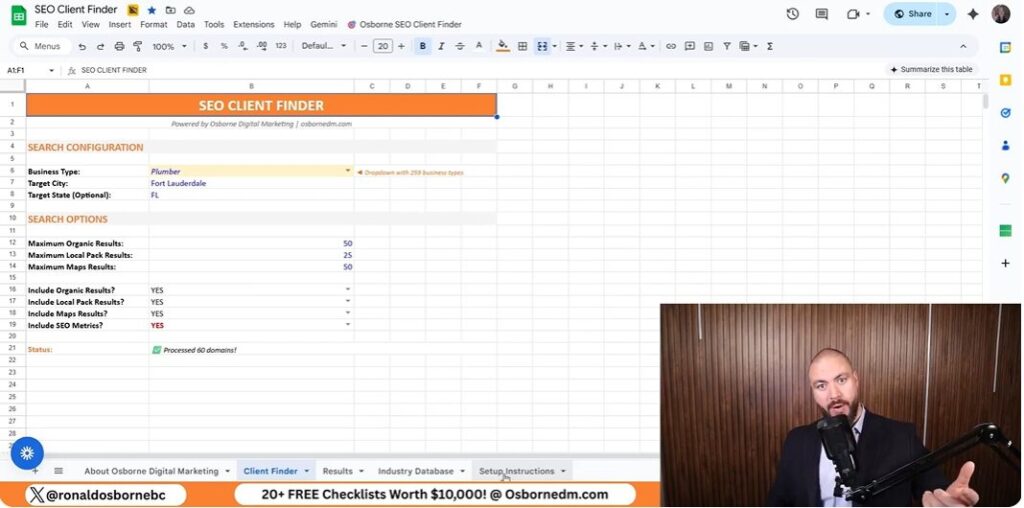
Let’s get straight into the nuts and bolts of how to get SEO clients using the SEO Client Finder Tool from Osborn Digital Marketing - and why it’s not nearly as technical (or intimidating) as it sounds.
Step 1: Downloading The Sheet And Finding The Right Checklist
First, head over to the Osborn Digital Marketing website. You’ll see a bunch of free resources and checklists, but don’t get distracted - scroll all the way down until you spot the SEO Client Finder sheet. This is the main tool you’ll use to uncover businesses that are losing SEO ground and are ripe for outreach. Download the sheet to your device. The interface is refreshingly simple: think of it as a supercharged spreadsheet, not some complicated dashboard.
Step 2: The Not-So-Scary ‘Data For SEO API’ Setup
This next part sounds techy, but it’s honestly a breeze. You’ll need a Data For SEO API key to pull in real-time data. Here’s how I did it:
- Go to the Setup tab in the sheet.
- Enter your email address and paste in your API key. (There’s a link to get your key - yes, it’s my affiliate link, but it gives you free credits, so it’s a win-win.)
- If you use my link, it helps me negotiate better deals for everyone down the line. Totally optional, but appreciated!
That’s it. No coding, no weird software installs - just copy, paste, and you’re ready to roll.
Step 3: Choosing Business Categories (All 209 of Them)
Now for the fun part: picking your target industry. The tool lets you choose from 209 different business categories. Whether you want to find roofers in Fort Lauderdale, dentists in Dallas, or even niche markets, you’re covered. I usually work with roofers, so I selected that category and set my location to Fort Lauderdale, Florida. You can search up to 1,000 prospects at once, but I recommend starting with a few hundred to keep things manageable.
Step 4: Running The Search And Filtering Out The Junk
Click the “Find SEO Clients” button and let the tool do its thing. In less than a minute, you’ll have a list of prospects complete with key SEO metrics. But here’s where a little sanity check goes a long way: filter out the sites you don’t want - like Yelp, Reddit, BBB, Forbes, and Gaff. These aren’t real prospects and will just clutter your results (plus, filtering them saves you a few cents on API costs). Simply untick these domains in the results tab.
Step 5: Getting The SEO Metrics That Matter
With your filtered list, hit “Get SEO Metrics for Selected.” The tool will pull in valuable columns like:
- Traffic Value (how much their organic traffic is worth)
- Total Keywords
- Referring Domains and Total Backlinks
- Domain Rank
- Lost Keywords (my favorite - shows who’s losing ground fast)
I focus on businesses that have lost a chunk of keywords recently. These are the folks who know what SEO is and are feeling the pain of dropping rankings. For example, a roofer with 68 reviews and nearly 100 lost keywords in the last month is a prime candidate - they’ve tasted SEO success but are slipping, making them much more likely to respond to a well-timed outreach call.
Pro Tip: Direct Outreach
The sheet even gives you phone numbers for direct contact. I always recommend calling first - nothing beats a real conversation when a business is losing visibility and needs help fast.
Making Metrics Actually Useful: Lost Keywords And Traffic Value
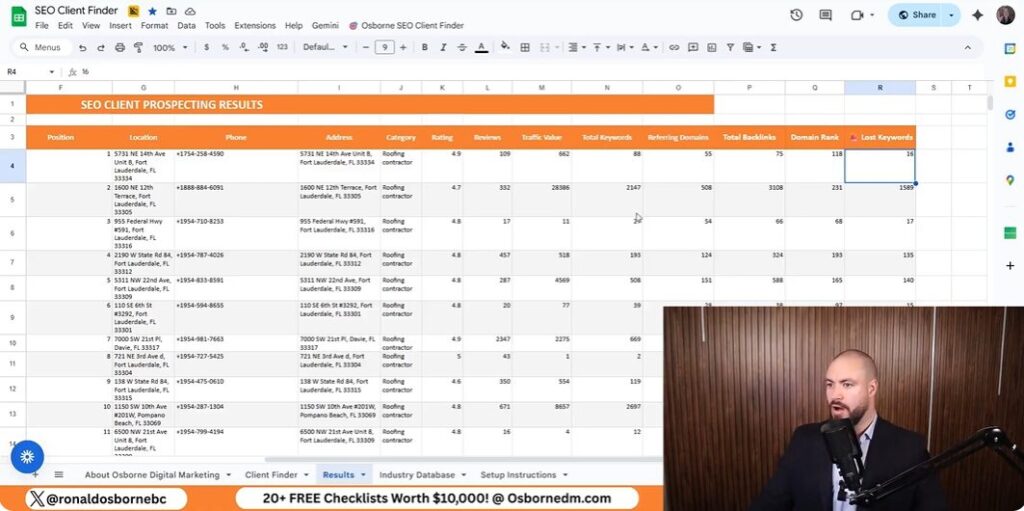
Let’s get real: most SEO tools drown you in metrics, but only a handful actually matter when you’re hunting for clients who need your help right now. After running the Osborn SEO Client Finder, you’ll see a bunch of columns - traffic value, total keywords, lost keywords, referring domains, backlinks, domain rank, and more. But here’s the truth: I only care about a select few, and I’ll explain exactly why.
Which Columns I Actually Look At (And Which I Ignore)
- Traffic Value: This is a dollar estimate of what the site’s organic traffic is worth. It’s not perfect, but it gives you a quick sense of whether the business is already getting real leads from Google. If the number is zero, I move on.
- Lost Keywords: This is my secret weapon. It shows how many keywords the site has dropped in the last 30 days. If a business is losing keywords, it means they’ve had SEO traction before - but something’s broken. That’s where I come in.
- Total Keywords: I glance at this to make sure the site isn’t a total ghost town. If they’re ranking for a decent number of keywords, it means Google has already “noticed” them.
- Number of Reviews: Especially for local businesses, I check this to avoid brand new companies (with just a handful of reviews) and to skip those dominating the top spots.
Honestly, I ignore most of the other columns - referring domains, total backlinks, and domain rank - at this stage. They’re useful for audits, but not for fast prospecting.
Why ‘Lost Keywords’ Is Secretly The Most Potent Metric
Here’s why I obsess over the lost keywords column: it’s the clearest signal that a business is hurting and likely to be receptive to your pitch. If a site is bleeding keywords, they’re losing visibility, leads, and revenue - often without even realizing it. When you point this out, you instantly position yourself as someone who can solve a problem they didn’t know they had.
Most agencies chase after businesses that have never ranked. That’s a tough sell. I target those who’ve already tasted SEO success but are slipping. They’re more motivated, they understand the value, and they’re often desperate for a fix.
Real Example: The Roofer Ripe For A Cold Pitch
Let me show you how this works in the wild. In my last search, I found a roofing company - let’s call them “Dolphin Roofing” in Fort Lauderdale. They’re sitting at position 13 in the Google Map Pack, with 68 reviews. Not at the top, not brand new - right in that sweet spot. But here’s the kicker: they lost almost 100 keywords in the last 30 days.
“Hey, I noticed you’ve lost 91 keywords this month. That’s a lot of potential customers slipping away. With a few tweaks, you could easily move up and grab those leads back - especially since your top competitor only lost 16.”
That’s my opener. It’s specific, urgent, and positions me as the solution.
My Unscientific Rule: Who I Avoid
- Total Noobs: Anyone with just a handful of reviews or zero traffic value. They’re not ready for SEO yet.
- Top Dogs: If someone’s already dominating the Map Pack or search results, they’re not likely to switch providers.
- Bottom Dwellers: If a business is languishing at the very bottom, it’s usually a sign of deeper issues or lack of investment.
Instead, I zero in on those in the middle - established, but slipping. That’s where the real opportunity lies, and why “lost keywords” is my go-to metric for effortless client acquisition.
Cold Calls, Awkward Accents, And Actual Responses: My Pitch Process Unpacked
Let’s get real for a second: nothing beats the impact of a live conversation, even if you’re dialing in from the other side of the world with an Aussie accent like mine. After years of prospecting, I’ve learned that calling potential SEO clients first - before sending a single email - makes all the difference. Sure, it’s nerve-wracking. Yes, my accent sometimes throws people off. But the power of a direct, human conversation trumps any cold email or LinkedIn message every single time.
Here’s why I always pick up the phone first: when you call, you’re not just another faceless pitch in their inbox. You’re a real person, genuinely interested in their business. And thanks to the Osborn SEO Client Finder, I’m armed with hyper-relevant data - like their current map pack position, how many keywords they’ve lost, and their review count. This means I can open with, “Hey, I noticed Dolphin Roofing dropped nearly 100 keywords this month and slipped to position 13 in the map pack. I help businesses like yours recover lost rankings - would you be open to a quick chat?” That kind of specificity immediately sets me apart from generic sales calls.
But let’s be honest: not every call goes smoothly. There was one time my accent nearly cost me a deal. I was speaking with a Florida-based roofer, and halfway through my pitch, he interrupted, “Wait, where are you calling from? Are you even local?” I realized then that some American clients might be wary of outsiders, especially in industries like roofing where trust is everything. What I learned? Always address it up front. Now, I’ll say, “You might notice my accent - I’m originally from Australia, but I work with businesses across the U.S. and have helped several right here in Fort Lauderdale.” That transparency builds trust and diffuses any awkwardness before it can derail the conversation.
Of course, not everyone answers their phone, and that’s where cold email comes in as my trusty backup. The trick is to make your outreach feel as human as possible. I always reference the exact data points I found - like their lost keywords or map pack position - so they know I’ve actually done my homework. I avoid templates that sound robotic or spammy. Instead, I write as if I’m continuing the phone conversation: “I tried reaching you by phone because I noticed your site recently lost visibility for 91 keywords. I have a few ideas that could help you regain those rankings quickly - would you be open to a quick call?”
When it comes to choosing who to pitch, I focus on what I call ‘no man’s land’ clients. These are businesses that aren’t brand new (so they have some reviews and history), but they’re not dominating the map pack either. They’re stuck in the middle - like Dolphin Roofing with 68 reviews and a position just outside the top 10. These businesses have already invested in SEO, experienced some success, and now feel the sting of lost rankings. They’re motivated, pre-qualified, and much more likely to see the value in what I offer.
In the end, my process on how to get SEO clients is simple but powerful: use real-time data to identify the right prospects, reach out with a personal touch (accent and all), and position myself as the solution to their very real, very urgent problem. Whether you’re a seasoned SEO pro or just getting started, don’t underestimate the power of a well-timed call, a relevant message, and a little bit of human awkwardness. That’s how I turn cold leads into loyal SEO clients - one conversation at a time.