I help accountants find new clients without blowing money on pricey ads. I built a system that just needs a free Google Sheet and a basic API. I use it myself and teach it because it’s reliable and not a pain to manage.
I break everything down into clear steps, so you don’t need to be a tech wizard. You’ll see how to build a targeted list by industry and location, then reach out in a way that feels natural. In this article, you will learn how to get accounting clients effectively using my free lead generation tool.
When I compare traditional options to direct, data-driven methods, the cost gap is just wild. Paid tools and ads want money upfront, but this approach uses a tiny API credit to grab hundreds of contacts.
| Method | Typical Cost Per Lead |
|---|---|
| Paid ads | $50–$150 |
| Sales tools | Monthly fees |
| Direct data scraping | Under $0.50 |
I can pull dozens of leads in about 30 seconds for just a few bucks. That difference adds up fast.
Paid ads make you spend before you know if anything will work. Platforms like LinkedIn Ads and Google Ads just keep raising costs as more people jump in.
You need a steady budget. If you stop paying, your leads dry up. Most new firms don’t have $2,000 a month to burn.
I get better results when I reach out directly by phone or email. Thirty minutes a day can beat expensive ads, honestly.
Cold outreach is flexible. I can call, email, or use contact forms - whatever feels right that day.
This method keeps spending low and puts me in direct contact with real businesses.
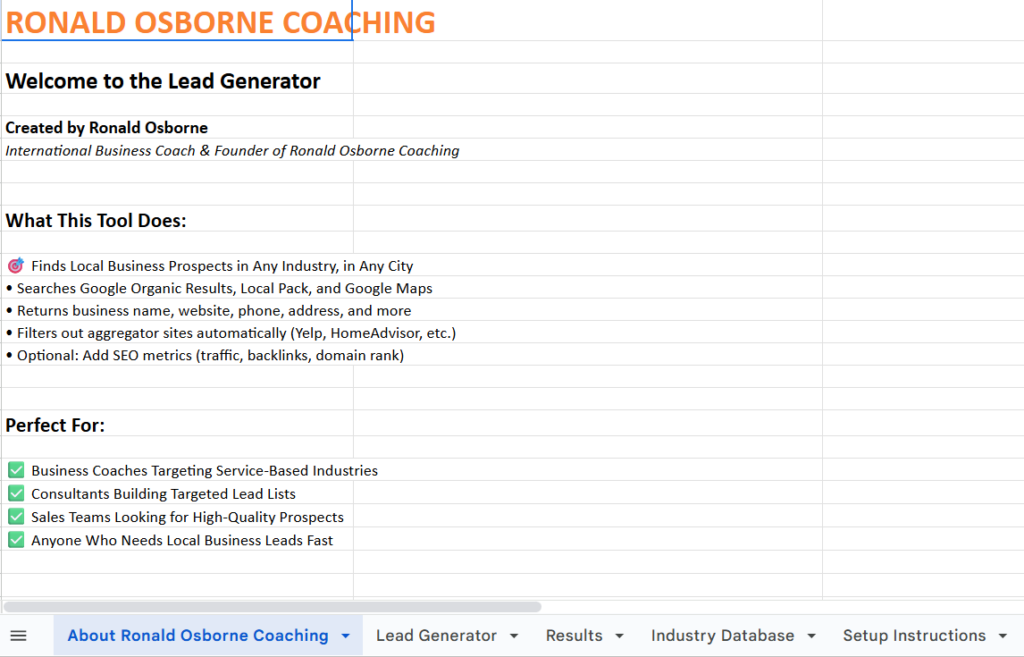
I use a Google Sheet that pulls business data with an API call. The sheet collects company details and turns them into a clean lead list.
I just hit the Client Finder button, and the sheet runs the request. In about 30 seconds, it fills up with real businesses I can contact.
I open the sheet and click the Setup tab at the bottom. I follow the prompts and paste my API details.
Basic flow
The process stays simple. No tech headaches here.
I create an account with DataForSEO using the link provided. The account includes a free dollar of credit.
That credit covers hundreds of lead pulls. No monthly fees or expensive software needed.
I pick exactly who I want to work with. The sheet supports 249 industries and works worldwide.
I set the business type and then choose the country, state, or city. If I only want dentists or roofers, I just select that group.
Key settings
I usually limit each run to 250 results. That keeps costs low and lists focused.
In one example, the sheet gave me 70 leads. The estimate showed a cost around 38, but actual usage was closer to 12.
| Method | Typical Cost Per Lead |
|---|---|
| Google Sheet + API | Under $0.50 |
| LinkedIn Ads | $50–$150 |
I get names, websites, and contact details. I can cold call, email, or send contact forms straight from the list.
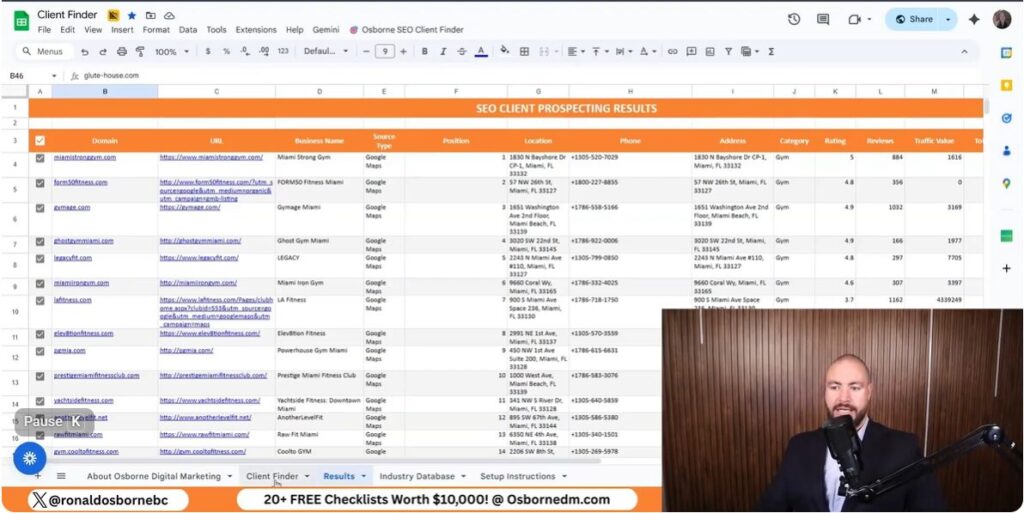
I use a simple Google Sheet with an API to build low-cost lead lists. I control the industry, location, and list size before I pull any data. These data are important as you explore how to get accounting clients using my free lead generation tool.
I choose the exact industries I want to serve. The sheet gives me hundreds of industry options so I can avoid clients I don’t want.
This lets me work with businesses I actually understand.
I set the country, state, or city before I run the search. This works worldwide, so I use it no matter where I operate.
| Setting | What I Control |
|---|---|
| Country | Where the business operates |
| State or Region | Local focus |
| City | High intent areas |
Local leads usually respond better when I reach out.
I pull contact details, websites, and business names in one place. The search runs fast and returns a clean list.
I spend about 30 minutes a day working these leads and keep costs low.

I use short daily call blocks to reach people from the lead list I build in Google Sheets. I target one industry and one location, so every call stays relevant.
How I do it
| Method | Typical Cost per Lead |
|---|---|
| My lead sheet + calls | Under $1 |
| LinkedIn ads | $50–$150 |
I like calling because I hear what businesses are dealing with right now. It helps me adjust my offer fast.
If I don't want to call, I use the website details from the same list. Most sites show an email or a contact form.
What I send
Where I send it
This approach works best when I keep it simple and direct. It costs almost nothing and uses the same lead list I already built.
I can hand this lead list to someone else and let them do the outreach. I can hire a caller for about $500 per month to handle calls or emails for me.
This saves my time and keeps costs low. I still control the list and the message.
Outreach options I use:
I rely on a Google Sheet with an API connection to pull leads fast. The setup takes a short time, and the process runs in about 30 seconds per search.
I choose the industry, location, and list size. The tool works in many countries and across 249 industries.
What the system gives me:
I try to keep spending low by avoiding paid ads. I get a free API credit that returns hundreds of leads for just a few cents each.
Here's how my costs usually break down:
| Item | Typical Cost |
|---|---|
| API lead data | Under $50 for 100+ leads |
| Outreach hire | About $500 per month |
| Total monthly spend | Around $600 or less |
I skip tools like paid ads, which can run $50 to $150 per lead. If you don't have a big budget, this method honestly feels like the only thing that makes sense. Use this free tool to explore and learn how to get accounting clients.
