I run a staffing agency and help others find steady clients without blowing cash. Here, I’ll show you how I spot businesses that need staff and actually reach them - no fluff, just steps that work.
I stick with tools and methods on how to get clients for a staffing agency that save time and keep spending low. I’ll also walk you through how I turn a simple list of details into real conversations that get results.
I’ve got a free sheet I share via my site. Click the link and it pops open right away.
Setup’s easy. I just follow the setup tab and connect the data tool so the sheet can pull in results.
I start by picking one industry and one city. The sheet gives me hundreds of industry types to pick from.
Examples I use:
I type in the city and the industry. The sheet searches Google and pulls matching businesses.
I hit the button and let the search run. In about 30 seconds, I get results.
The list comes back simple and clear:
| Data Shown | What I Use It For |
|---|---|
| Business name | Identify the prospect |
| Website | Visit or use the contact form |
| Send direct outreach | |
| Phone number | Cold call the owner |
| Address | Visit in person if needed |
Usually, I pull around 200–250 leads at once. The tool runs on credits, but the free credit gives me hundreds of searches.
I reach out by email, phone, or even in person. Cold calling tends to work best if I can focus and have the time.
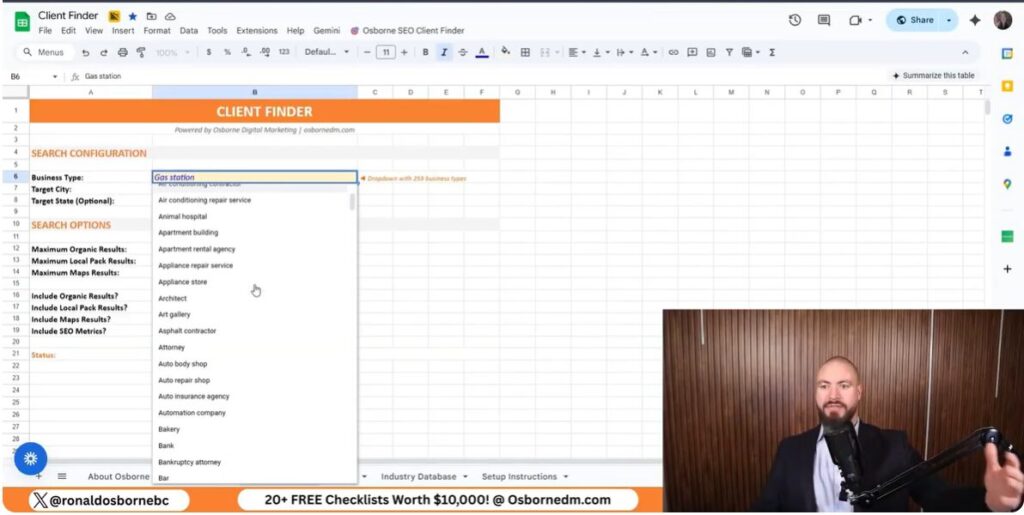
I always pick one clear business type to target. There are tons of options - auto shops, salons, bars, clinics. Staying focused on one niche keeps my outreach sharp and relevant.
Examples of industries I use:
I enter one city and one industry into the client finder. This narrows it down to local owners who might need staff right now.
| Setting | What I Enter |
|---|---|
| Location | One city |
| Category | One industry |
| Lead count | About 200–250 |
This pulls real business data straight from Google.
I click search and let the tool do its thing. Usually takes about 30 seconds. Then I get a list with all the contact details I need.
Each lead includes:
I reach out by email, contact form, phone, or in person. If I can, I’ll call or visit them. I set up the data connection once and get enough credit to pull hundreds of leads without spending anything.
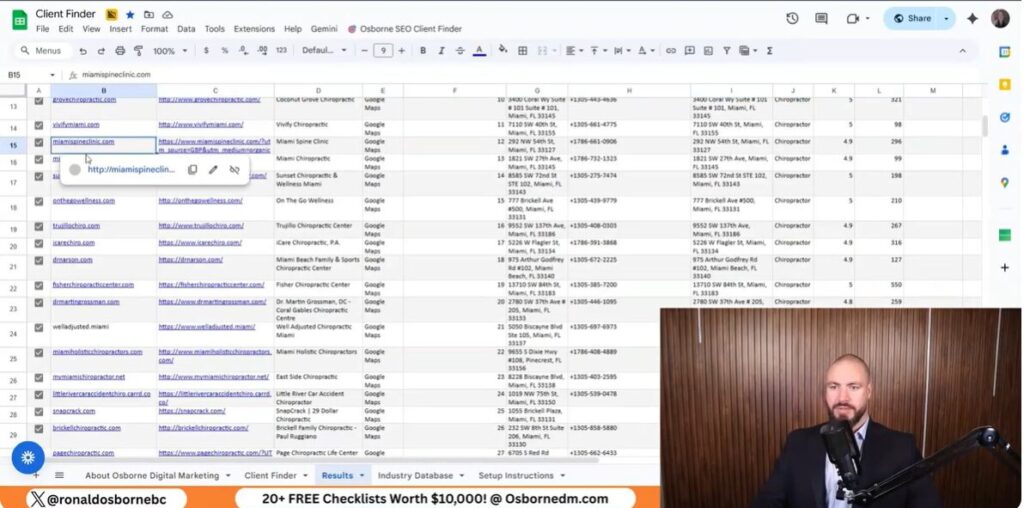
I use the client finder to target one industry and one city at a time. I keep the list small - usually 200–250 businesses - so it’s accurate and manageable.
Here’s what I grab from each listing:
I check out each site to decide the best way to reach out. Some owners like email forms, others just drop a phone number.
If I’ve got the time, I call. Cold calling works best if I stick to one niche and stay focused.
I just go down the list and ask a few quick questions:
Most owners need workers, so it’s not a hard sell. I keep the call short and to the point.
Sometimes, I visit owners in person. The sheet gives me their location, so it’s easy to find them.
When I visit, I try to:
This works for people who want action and direct contact. If you’re just starting out and have more time than money, it’s a solid move as you learn how to get clients for a staffing agency.
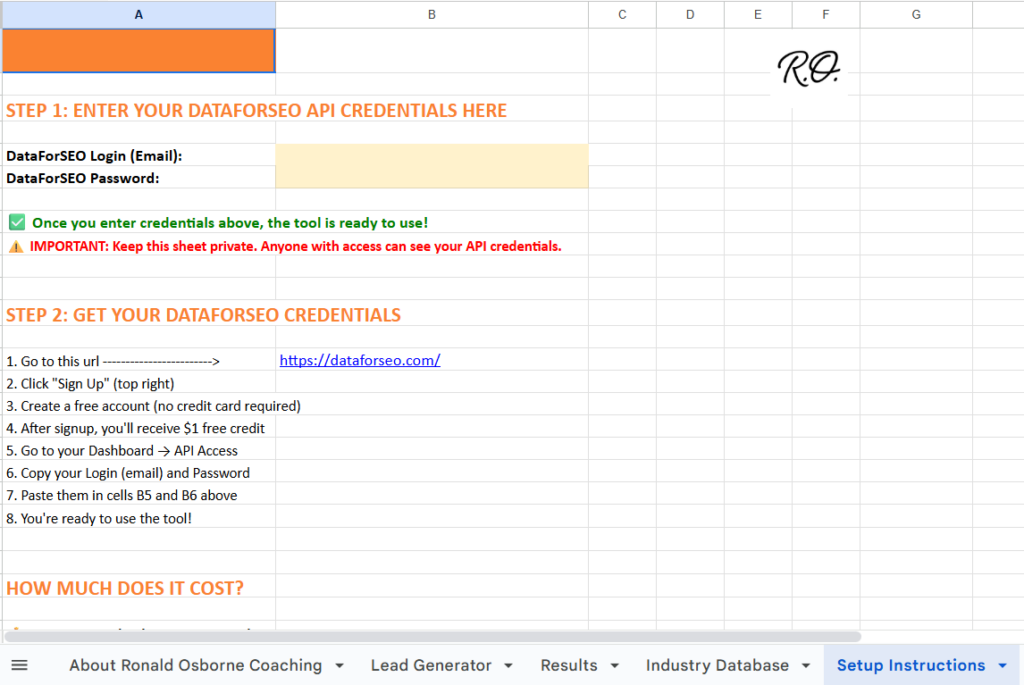
I use the DataForSEO API inside the client finder sheet to pull real business data from Google. This setup lets me grab targeted leads fast, and I don’t have to pay upfront.
I open the setup instructions tab in the sheet and follow the link to DataForSEO. Signing up with their link gives me free credit.
Setup takes about three minutes. Once I add the API info to the sheet, it runs by itself and starts pulling results by city and industry.
The free credit is about one dollar, which covers hundreds of searches. Each small run only costs a few cents.
I keep each run to 200–250 results to save money and keep things accurate. Searches usually wrap up in about 30 seconds.
What I get from each result:
I use this info to email, call, or visit business owners. It costs nothing but time and gives me leads that actually matter.
I focus on local search so business owners nearby can find my agency when they need staff. I only target one city and one industry at a time to keep leads sharp. Trying to reach everyone just doesn’t work as well.
What I do for local reach:
This method barely costs anything and mostly just takes time.
I use Facebook ads when I want to reach more people without spending a fortune. It works well for staffing agencies that stay focused on one industry. I consistently see better value here than with other paid channels, especially when my budget’s tight.
Why I use Facebook ads:
If I only had $1,000 to spend, I’d honestly start here.
I lean on social platforms as a practical way to get things moving early on. When cash is tight, direct outreach just makes more sense.
I’ll grab a lead list and start calling, emailing, or even dropping by businesses if I can swing it. Sometimes, that’s what actually gets a response.
Ways I reach business owners:
Honestly, nothing beats direct work for building trust and kicking off real conversations. It’s not always quick on exploring how to get clients for a staffing agency, but it’s worth it.
I help consultants find and reach real clients without burning money or time. I built my own companies and worked with business owners who want steady growth, not hype.
My focus is always on simple actions that spark real conversations. In this article, I’ll walk through my approach on how to get consulting clients, how I earn trust, and how I decide where - if anywhere - to spend money.
I’ll also share how I use basic tools and direct contact to build momentum early on.
I work with consultants who serve many fields or stick to one niche. My client finder lets me target by industry and location, so I can reach the right businesses without wasting time.
I pull clear details for each prospect so my outreach stays direct and simple. The tool gives me what I need to start real conversations.
| What I See | Why It Matters |
|---|---|
| Business name and website | I check fit and context fast |
| Phone number and address | I contact them right away |
| Category and industry | I stay niche-focused |
| Google position and reviews | I gauge visibility and trust |
I can narrow results across hundreds of industries and set specific cities or regions. I control the result size and include map and organic listings to widen the view.
I focus on credibility when I talk to leads. Awards, proof, and visible work help turn interest into calls.
I avoid paid ads unless I’ve got a solid budget and strong proof. Usually, I start with direct outreach and calls. This builds rapport and opens doors to referrals.
Referrals drive a lot of my work. Even if a prospect doesn’t need help, they often know someone who does. I lean on those connections to grow steadily.

Credibility drives conversions in consulting. I show proof of my results through awards and past work, and I can point to clear wins from my own businesses and clients.
I focus on visible trust signals before pushing any hard offers. People need proof before they commit.
Ways I show credibility:
I don’t touch paid ads unless the basics are in place. Ads only make sense when I already have proof and enough budget to support them.
| Credibility Factor | My Standard |
|---|---|
| Paid ads budget | At least $3,000 per month |
| Social proof | Dozens of testimonials |
| Content | Dozens of videos |
| Trust source | Referrals and direct talks |
I build trust faster by speaking directly with prospects. Phone calls help me understand their needs and start real relationships.
Referrals matter a lot in my work. Some of my biggest projects came from people recommending me to others they trust.
I also make myself accessible. I offer a free 15-minute call, paid longer sessions, and a free Facebook group where I answer questions myself.

I use a free client search tool on my website to find consulting leads fast. It pulls business names, websites, phone numbers, addresses, reviews, and Google positions into one sheet.
I set it up once with an email and an API key. The system runs in the background and returns results in about a minute.
I choose who I want to work with by industry and location. The tool supports hundreds of industries, so I can stay broad or niche.
Examples I use
This lets me contact businesses that fit my services instead of guessing.
After the run, I review the results tab and start outreach. I focus on calling first to build trust and start real talks.
What I review before contact
I avoid paid ads unless I have a strong budget and solid proof like videos and testimonials. I rely on direct contact and referrals because they drive most of my work.
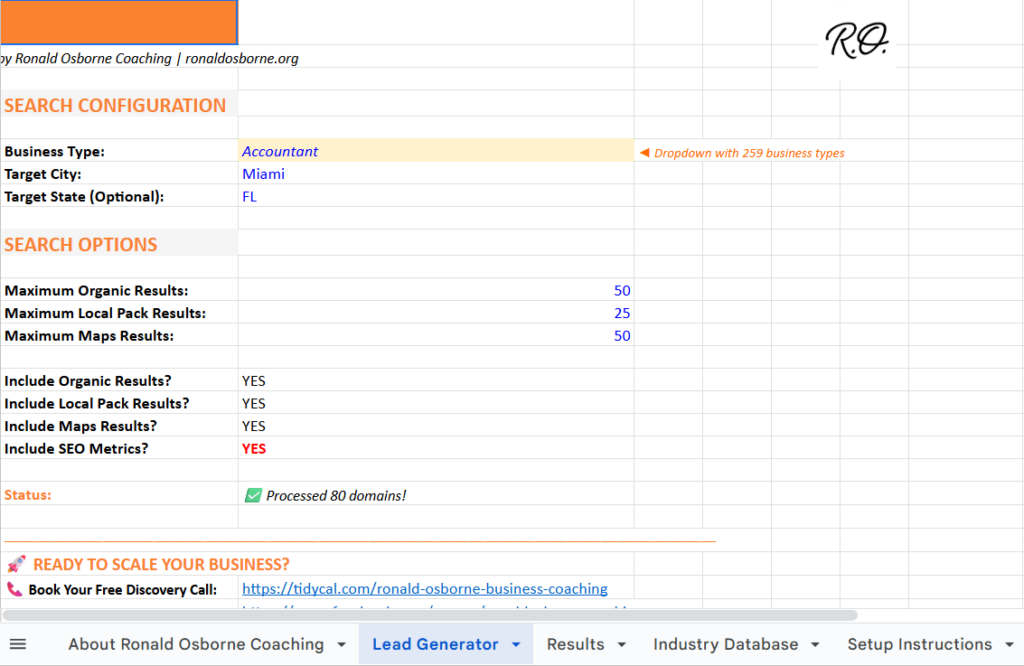
I start by going to my website and clicking the link that opens the client finder. This tool pulls live business data for consultants who want new leads.
Once it loads, I see details like business name, website, phone number, address, Google ranking, and business category. I use this data to contact the right people fast.
I set the industry and location to match who I want to work with. There are hundreds of industries, and I can narrow results by city or region.
I also set how many results I want. I keep it at 250 and turn on both map and organic listings.
What I usually set:
I open the Google Sheet that comes with the tool. Inside the setup tab, I click the link to connect the API.
I paste my email and the API key they give me. The setup’s simple and gives me free credits, so I can pull leads without paying.
What I need to enter:
| Field | What I add |
|---|---|
| My email address | |
| API Key | Key from the setup page |
I go back to the client finder tab and click the button to run the search. The tool works in the background and finishes in about a minute.
When it’s done, I review the results tab. I see websites, locations, reviews, and contact info, all ready for outreach. I use this list to call, email, and ask for referrals if needed.
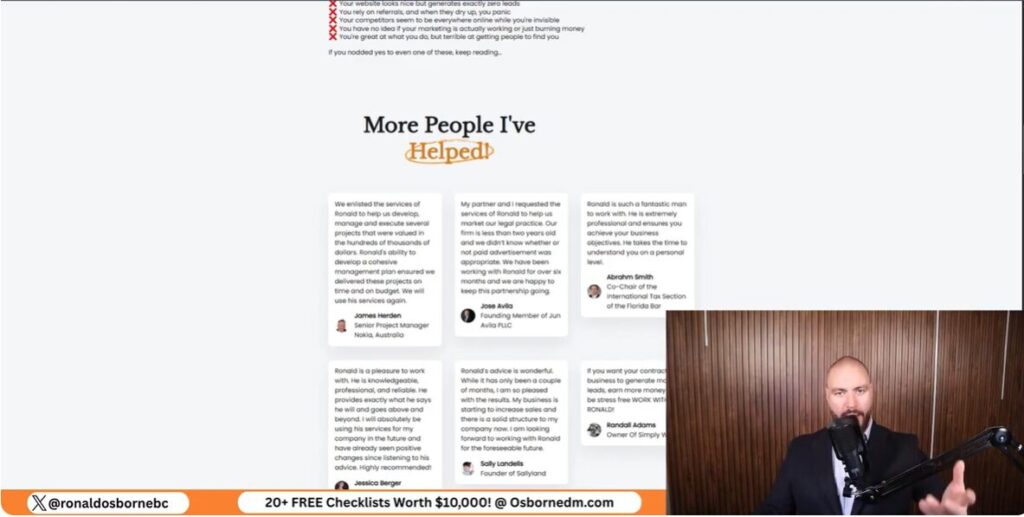
I reach out using the contact details I pull for each business - phone numbers, websites, whatever works. I target by industry and location so my message fits who they are. This is a very important aspect to look into as you learn how to get consulting clients using my free tool.
What I use to contact prospects
I focus on people who likely need help, not mass blasts.
I build trust by getting on the phone and talking through real needs. I rely on credibility to convert, not ads.
What helps build trust
I avoid paid ads unless I have strong proof and a real budget.
I ask for referrals because they drive most of my best work. Even if someone doesn’t need help, they may know someone who does.
How referrals support growth
I depend on referrals to scale my consulting work.
I don’t recommend paid ads for most consultants at the start. Ads only make sense when I can spend at least $3,000 per month and back up that spend with proof.
If I don’t have that budget, I focus on direct outreach and conversations. That lets me build trust faster without paying for clicks.
Credibility drives results for consultants. I get better conversion when I show clear proof of past work.
I rely on:
Without this proof, ads struggle to convert interest into calls.
Experience really shifts how much paid ads are worth. New consultants usually see better results by reaching out directly and leaning on referrals.
| Level | Monthly Ad Spend | Recommended Focus |
|---|---|---|
| New consultant | Under $3,000 | Calls, referrals, rapport |
| Established consultant | $3,000 or more | Paid ads with proof |
Honestly, most of my biggest wins as I learn how to get consulting clients came from referrals. I still stick with them - trust just moves faster than ads ever could.
I help coaches find clients using clear, practical methods that actually work right now. I’ve built and tested these strategies across lots of service businesses in different regions, so I know what brings real leads and what just burns cash.
I focus on credibility, simple tools, and spending smart. My goal is to help you reach business owners quickly, start conversations, and pick marketing channels that fit your budget - even if that budget’s tiny. Read more and learn how to get coaching clients effectively.
I built and scaled my own companies to multi‑million dollar levels. You’ll see the industry awards I’ve earned displayed behind me.
I founded Osborne Digital Marketing, and my results show what I teach actually works. I rely on outcomes I’ve achieved myself - not just theory.
Highlights
I’ve worked across Australia, the United States, the Middle East, and Russia. I’ve built and supported companies in each market.
I focus on service-based businesses and have worked with all kinds of clients.
Industries I have worked with
I also run and grow my own local branches. One location shows 51 public reviews, which reflects consistent client results and long-term work in the field.
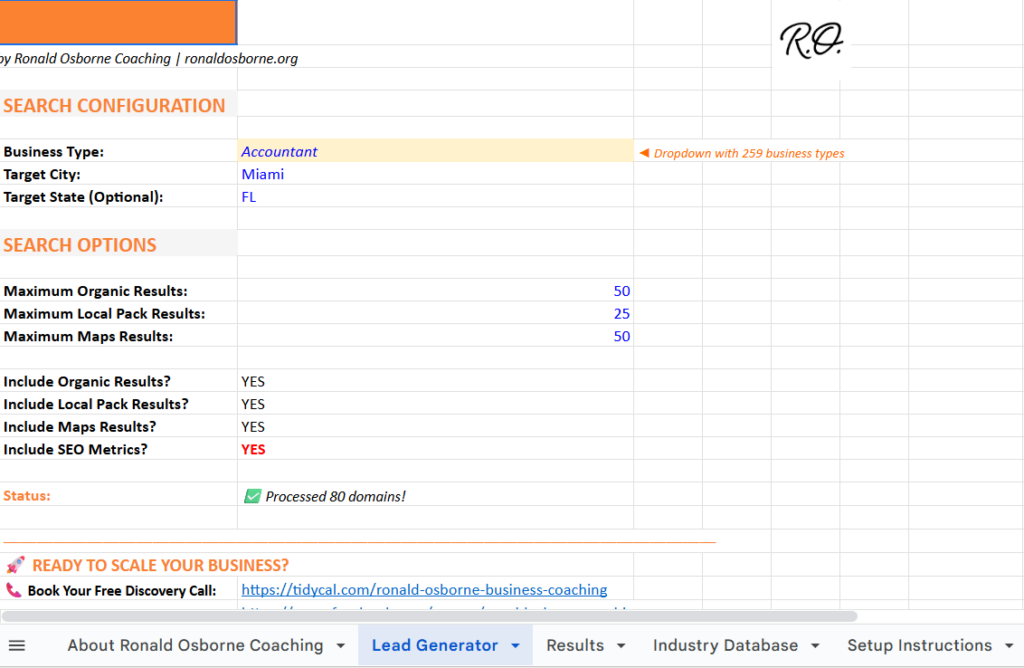
I built a free client finder inside my Osborne Digital Marketing website. It’s my main method to pull coaching leads fast.
To use it, I just click the button on my site or use the link below the video. I scroll down and pick the SEO Client Finder option.
I open the setup tab and follow the link to create an API key. The process is simple - even if you’re not technical.
All I do is enter my email and the API key into the fields. That’s it. The tool’s ready to go.
| What I Add | Why It Matters |
|---|---|
| Connects results to me | |
| API Key | Lets the system pull leads |
I choose a city and an industry to narrow the results. I can target any service field, including coaches who serve trades or professionals.
Once I set the lead limit, I hit Find Coaching Clients. The system runs for about 30 to 60 seconds and then gives me results.
Each lead includes:
I start with businesses that rank lower in search results. These owners usually need help and respond better.
I’ll call them, email them, or use the contact form on their site. Most of the time, I get through to the business owner directly.
If my budget’s small, this is always my first move. With just 30 minutes a day, I can contact dozens of real prospects for almost nothing.
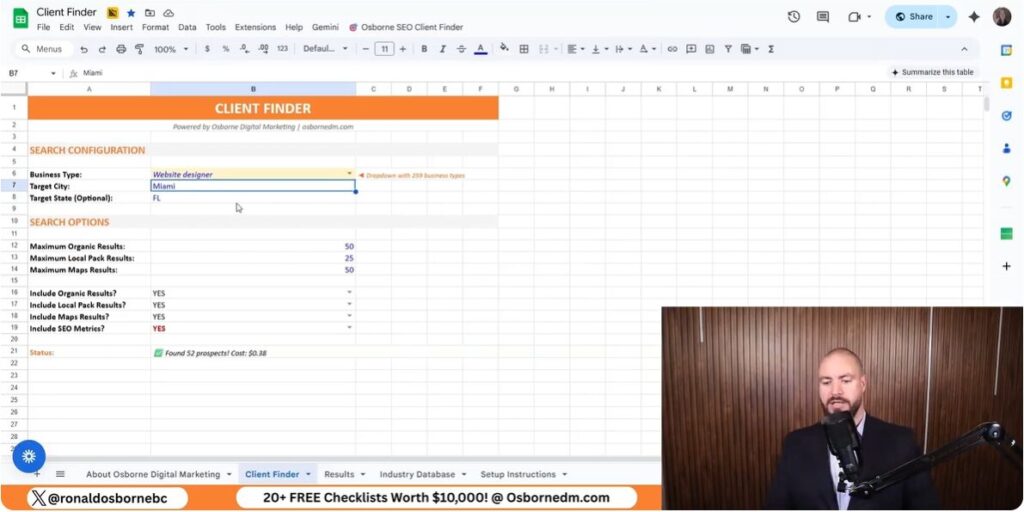
I use my client finder to pull phone numbers fast. It gives me hundreds of leads for less than a buck.
I pick an industry and city, run the search, and start calling. If I spend 30 minutes a day on calls, I reach owners right away.
How I work the list
The same list gives me email details when available. I email owners who don’t answer the phone.
I keep emails short and direct. I target people who need help because they rank below the top results.
| Step | What I Do |
|---|---|
| Find leads | Use industry and location |
| Choose targets | Pick lower-ranked sites |
| Send emails | Short, clear, personal |
If I don’t call or email, I use the website link in the sheet. Most sites have a contact form that goes straight to the owner.
I fill out the form with a clear message and move to the next lead. This saves time but still reaches decision-makers.
This approach works best when money’s tight and you’ve got more time than cash.
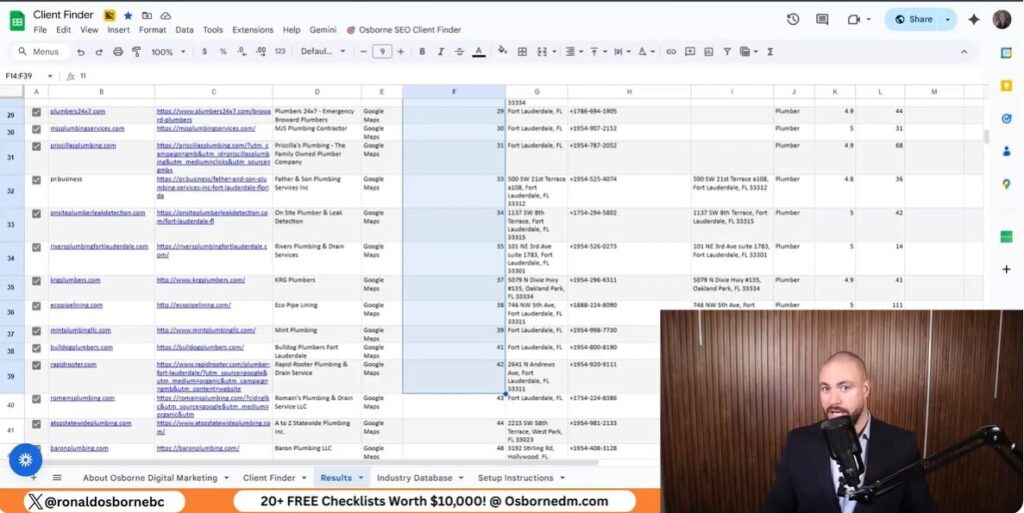
Search visibility builds long-term demand when people look for help. I invest in search work because it keeps sending leads even after I finish the setup. Reviews matter - a higher review count often drives more calls.
What I focus on with search
Google Ads bring fast leads while search visibility grows. I like this channel because people already want the service when they click. Costs stay clear and measurable.
Typical Google Ads numbers I see
Social ads cost less per lead, but intent is lower. People often click and forget. LinkedIn costs more and honestly hasn’t worked well for me with coaching offers.
| Channel | Lead Cost | Intent | Notes |
|---|---|---|---|
| Lower | Lower | Needs more leads to convert | |
| Higher | Higher | Fewer leads convert | |
| Higher | Lower | Costs feel high for coaches |
I put most of my paid budget into Google first and use social ads with care. This is one of the factors to consider as you explore how to get coaching clients.

If you don’t have at least $2,000 per month for marketing, I start with my SEO client finder. It gives me hundreds of leads for less than a dollar and lets me call or email owners right away.
When I do have $2,000 per month, I split it like this:
| Channel | Monthly Amount | Why I Use It |
|---|---|---|
| SEO | $1,000 | Builds steady leads over time |
| Google Ads | $1,000 | Brings clients while SEO grows |
I avoid wasting money on tools that don’t match intent.
Not all leads convert the same way. I pay close attention to where they come from.
Google works better because people search with a clear goal. Social ads show interest, but a lot of people just move on by the next day.
I like SEO because it keeps working after I pay for it. When I spend $1 on SEO, I see about $5 - $8 back over time.
Paid ads stop the moment I stop paying. A Google click costs about $3 - $4, and a phone lead runs near $70. If ads fail, that money’s gone.
I focus on Google over LinkedIn. LinkedIn costs more, around $2 - $10 per click, and I just don’t see strong results for coaches.
I always start with proof. Show real results, reviews, and past wins - people need to trust you before they ever talk to you.
Without trust, no tool or ad will work. That’s just the truth.
I built a free client finder because coaches really need speed and low cost. I use it to pull local leads by industry.
Then I contact them by phone, email, or through their website. I focus on businesses that rank lower, since they usually need help and actually listen.
How I use the leads each day
If your budget stays tight, stick with this effective method on how to get coaching clients. It brings hundreds of leads for very little cost and doesn’t require tech skills.
When I have more budget, I split it up to keep leads coming in while SEO grows.
| Channel | Why I Use It | Key Cost Notes |
|---|---|---|
| SEO | Long-term leads that keep coming | $1 can return about $5–$8 |
| Google Ads | High intent and faster calls | Leads around $70 |
| Facebook Ads | Cheaper leads, lower intent | More leads needed per client |
| LinkedIn Ads | High cost for coaches | I avoid it |
I prefer Google Ads over social ads because people search with intent. They know what they want and act faster.
Social ads might look good, but honestly, a lot of people just forget them later. I keep my setup simple, track results, and put money only where I see calls and emails actually coming in.
I help accountants find new clients without blowing money on pricey ads. I built a system that just needs a free Google Sheet and a basic API. I use it myself and teach it because it’s reliable and not a pain to manage.
I break everything down into clear steps, so you don’t need to be a tech wizard. You’ll see how to build a targeted list by industry and location, then reach out in a way that feels natural. In this article, you will learn how to get accounting clients effectively using my free lead generation tool.
When I compare traditional options to direct, data-driven methods, the cost gap is just wild. Paid tools and ads want money upfront, but this approach uses a tiny API credit to grab hundreds of contacts.
| Method | Typical Cost Per Lead |
|---|---|
| Paid ads | $50–$150 |
| Sales tools | Monthly fees |
| Direct data scraping | Under $0.50 |
I can pull dozens of leads in about 30 seconds for just a few bucks. That difference adds up fast.
Paid ads make you spend before you know if anything will work. Platforms like LinkedIn Ads and Google Ads just keep raising costs as more people jump in.
You need a steady budget. If you stop paying, your leads dry up. Most new firms don’t have $2,000 a month to burn.
I get better results when I reach out directly by phone or email. Thirty minutes a day can beat expensive ads, honestly.
Cold outreach is flexible. I can call, email, or use contact forms - whatever feels right that day.
This method keeps spending low and puts me in direct contact with real businesses.
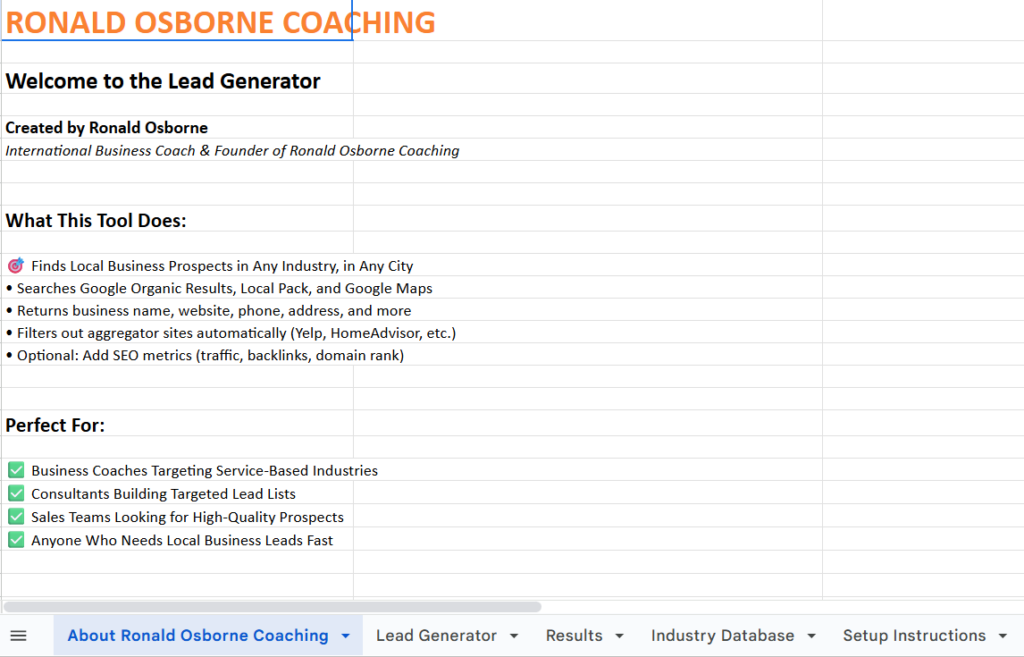
I use a Google Sheet that pulls business data with an API call. The sheet collects company details and turns them into a clean lead list.
I just hit the Client Finder button, and the sheet runs the request. In about 30 seconds, it fills up with real businesses I can contact.
I open the sheet and click the Setup tab at the bottom. I follow the prompts and paste my API details.
Basic flow
The process stays simple. No tech headaches here.
I create an account with DataForSEO using the link provided. The account includes a free dollar of credit.
That credit covers hundreds of lead pulls. No monthly fees or expensive software needed.
I pick exactly who I want to work with. The sheet supports 249 industries and works worldwide.
I set the business type and then choose the country, state, or city. If I only want dentists or roofers, I just select that group.
Key settings
I usually limit each run to 250 results. That keeps costs low and lists focused.
In one example, the sheet gave me 70 leads. The estimate showed a cost around 38, but actual usage was closer to 12.
| Method | Typical Cost Per Lead |
|---|---|
| Google Sheet + API | Under $0.50 |
| LinkedIn Ads | $50–$150 |
I get names, websites, and contact details. I can cold call, email, or send contact forms straight from the list.
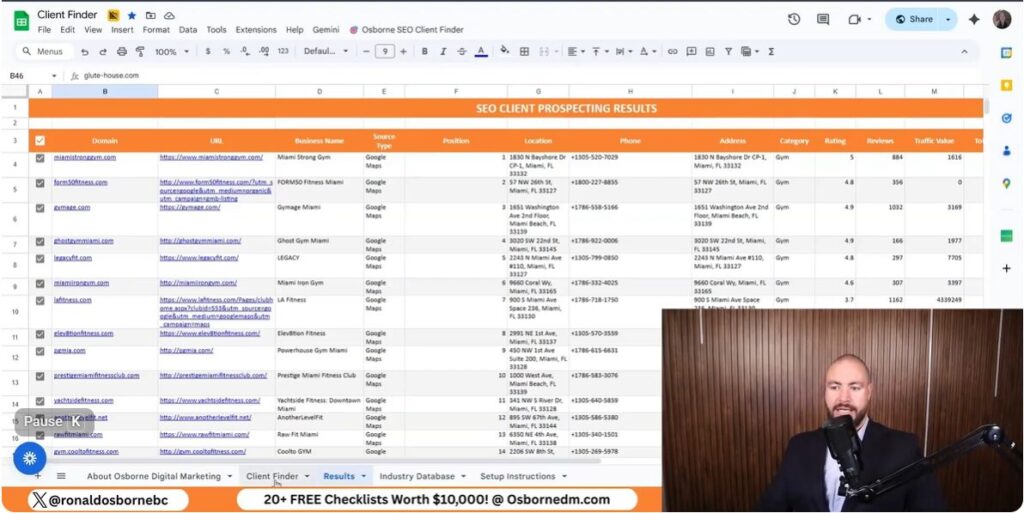
I use a simple Google Sheet with an API to build low-cost lead lists. I control the industry, location, and list size before I pull any data. These data are important as you explore how to get accounting clients using my free lead generation tool.
I choose the exact industries I want to serve. The sheet gives me hundreds of industry options so I can avoid clients I don’t want.
This lets me work with businesses I actually understand.
I set the country, state, or city before I run the search. This works worldwide, so I use it no matter where I operate.
| Setting | What I Control |
|---|---|
| Country | Where the business operates |
| State or Region | Local focus |
| City | High intent areas |
Local leads usually respond better when I reach out.
I pull contact details, websites, and business names in one place. The search runs fast and returns a clean list.
I spend about 30 minutes a day working these leads and keep costs low.

I use short daily call blocks to reach people from the lead list I build in Google Sheets. I target one industry and one location, so every call stays relevant.
How I do it
| Method | Typical Cost per Lead |
|---|---|
| My lead sheet + calls | Under $1 |
| LinkedIn ads | $50–$150 |
I like calling because I hear what businesses are dealing with right now. It helps me adjust my offer fast.
If I don't want to call, I use the website details from the same list. Most sites show an email or a contact form.
What I send
Where I send it
This approach works best when I keep it simple and direct. It costs almost nothing and uses the same lead list I already built.
I can hand this lead list to someone else and let them do the outreach. I can hire a caller for about $500 per month to handle calls or emails for me.
This saves my time and keeps costs low. I still control the list and the message.
Outreach options I use:
I rely on a Google Sheet with an API connection to pull leads fast. The setup takes a short time, and the process runs in about 30 seconds per search.
I choose the industry, location, and list size. The tool works in many countries and across 249 industries.
What the system gives me:
I try to keep spending low by avoiding paid ads. I get a free API credit that returns hundreds of leads for just a few cents each.
Here's how my costs usually break down:
| Item | Typical Cost |
|---|---|
| API lead data | Under $50 for 100+ leads |
| Outreach hire | About $500 per month |
| Total monthly spend | Around $600 or less |
I skip tools like paid ads, which can run $50 to $150 per lead. If you don't have a big budget, this method honestly feels like the only thing that makes sense. Use this free tool to explore and learn how to get accounting clients.
I’ve spent years watching search results shift from day to day. Those little changes can make or break an SEO campaign.
When I realized how much time and money businesses waste chasing impossible rankings, I built a free tool that measures search result volatility. It helps me spot which keywords are worth pursuing and which ones would just drain a budget with no results.
With this SERP Volatility tool, I can target any location or device and see how stable or unstable rankings are. That kind of info tells me if a keyword really has potential or if big competitors have it locked down.
Understanding those patterns saves effort and keeps SEO strategies focused on opportunities that actually pay off.
When I talk about SERP volatility, I mean how often and how much search results change for a keyword. If a site jumps from position 1 to 18 and back, that SERP is unstable.
A steady ranking pattern shows strength, while big shifts mean weak competition.
| Pattern | Meaning |
|---|---|
| Stable results (positions 1–3 rarely move) | Strong search results, harder to rank |
| Frequent changes (top 10 positions fluctuate) | Moderate competition, possible opportunity |
| Large swings (sites move 10+ positions) | Weak results, easier to penetrate |
I run my tool across 10 separate checks. It shows which sites hold steady and which ones bounce around.
Knowing how volatile a SERP is helps me decide whether a keyword is worth chasing. If the top listings barely move, I know I’ll need more time and resources to compete.
But if rankings shift often, it’s a sign I can enter more easily and maybe start earning faster.
Quick checks I make before targeting a keyword:

When I study SERP volatility, I see how much rankings move for a keyword. A stable SERP with little movement usually means strong competition.
If the top results rarely shift, ranking there will take more time and resources. Frequent changes show a weaker SERP that’s easier to target.
| SERP Behavior | Level of Difficulty | Recommendation |
|---|---|---|
| Minimal rank changes | High | Requires strong SEO effort |
| Moderate fluctuation | Medium | Possible with a solid strategy |
| Frequent shifts | Low | Easier to rank and worth targeting |
By tracking volatility, I can spot keywords where major competitors aren’t holding steady. These gaps often point to spots where I can move in fast and scoop up some traffic.
I also notice helpful patterns - like directories or local listings showing up - so I can use those same platforms to bring in leads.
Quick tips:
Analyzing SERP volatility helps me avoid wasting money on tough keywords. If I see that only big, established sites hold the top spots and rankings hardly change, I know not to chase them.
I focus my budget on SERPs where I can actually rank and get results faster.
Example:
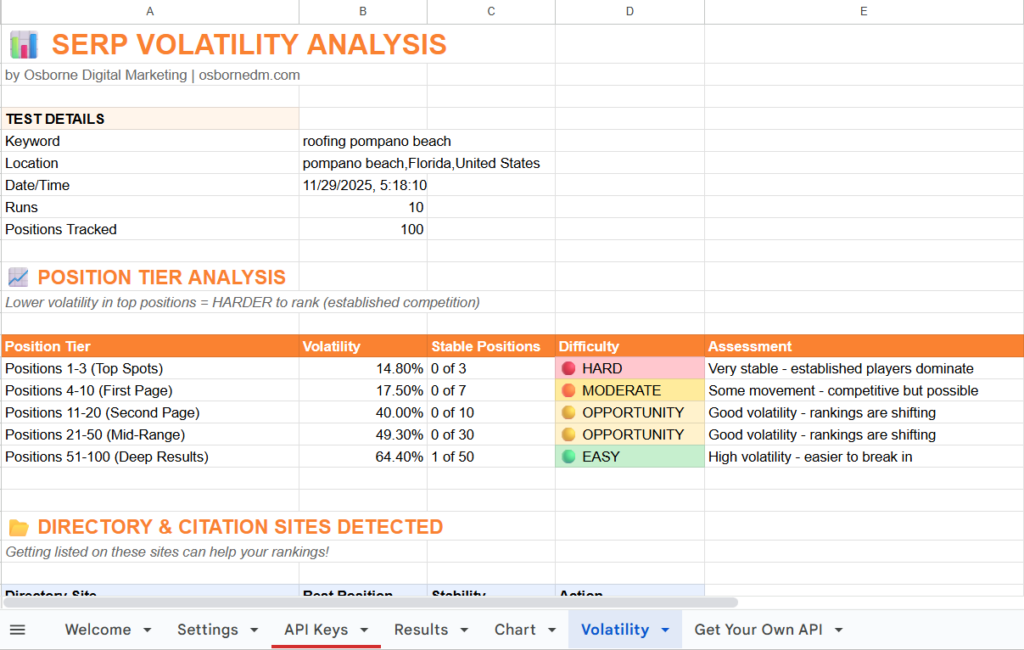
I built this free SERP volatility tool to help people test how unstable or stable a search result page is. It tracks ranking positions for up to 100 listings over multiple runs and shows how much those rankings change.
When a keyword’s results move a lot, that means there’s room to rank. If they barely move, it’s going to take more work and money to break in.
You can run tests for any city, state, or country, and choose between mobile or desktop results. The output includes details like ranking shifts, volatility patterns, and visible listings such as local directories.
This helps identify which types of listings create the real competition.
| Setting | Description |
|---|---|
| Location targeting | Test keywords in specific cities or countries |
| Device filter | Run checks for mobile or desktop users |
| Depth of analysis | Scans up to 100 results across 10 runs |
I’ve used plenty of paid tools that claim to track volatility, but most just mash all the ranking data into one number. That can mislead users because it hides how individual results actually move.
My tool shows the full picture, from position 1 to 100, so you can see when a SERP is unstable or locked down by big players.
Paid versions often cost hundreds of dollars a month. They perform similar scans but charge for each query or report.
This free version gives you detailed rank tracking without cost, while keeping the data transparent and actually readable.
Comparison Snapshot
| Feature | Free SERP Volatility Tool | Common Paid Tools |
|---|---|---|
| Cost | Free | Expensive (hundreds per month) |
| Data transparency | Shows full ranking range | Condenses into one score |
| Local targeting | Yes | Often limited |
| Runs per test | 10 | Usually fewer |
You can grab the tool straight from my website without paying anything. It connects through the DataForSEO API, which provides real ranking information.
New users can sign up through my referral link to get a small credit, which keeps the tool free to use.
Just enter the keyword, location, and device, then click Run Volatility Test. The tool handles the rest and spits out a chart and opportunity score.
This simple setup lets you figure out if ranking for that keyword makes financial sense before you spend money on a campaign.

I start by setting my keyword, location, and device type. The tool lets me focus on any city, state, or country, so I can test a search that fits my market.
I usually format locations as City, State, Country for accurate results. I can also switch between desktop and mobile views to compare performance.
Quick Setup Checklist:
Once everything’s set, I click Run Volatility Test. The system runs about ten scans and tracks up to 100 ranking positions.
It takes about a minute for the tool to collect the data. I let it finish without refreshing the page so I get the full results.
Example Steps:
After the scan finishes, I look at how much each result shifts. If a domain moves between position 1 and 18, that tells me the search results aren’t stable and ranking might be easier.
Stable positions from 1 to 3 usually show strong competition.
I use a small table like this to review scores:
| Range (Positions) | Level of Movement | Ranking Potential |
|---|---|---|
| 1–3 | Very stable | Difficult |
| 4–10 | Moderate | Possible |
| 11–30 | High movement | Higher potential |
When I notice directories like Yelp or Facebook ranking, I list my business there to capture leads quickly. I also check the Opportunity Score (shown out of 100) to decide if targeting that keyword is worth my time and budget.
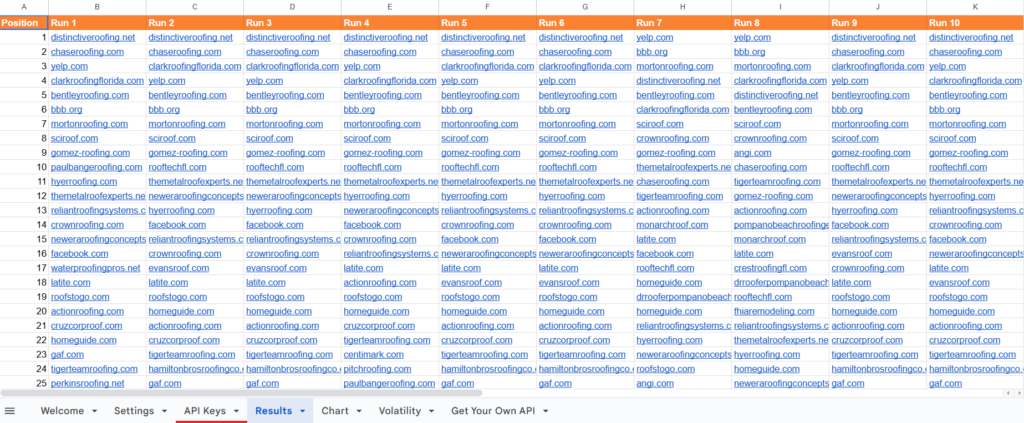
When I analyze a keyword, I start by running it through my SERP volatility tool. This tool tracks ranking shifts over ten runs and measures how stable or unstable the search results are.
If a site drops from position 1 to 18, that volatility tells me the search results are weak and open for competition. But if the same pages sit steady in the top 3, they’re likely hard to outrank.
I target local searches by setting the city, state, and country so the data actually reflects the environment I’m aiming to rank in.
| Rank Range | Volatility | Difficulty |
|---|---|---|
| 1–3 | Low | Hard to outrank |
| 4–10 | Moderate | Competitive |
| 11–30 | Higher | Possible opening |
When I review search results, I usually spot directories like Yelp, Houzz, Facebook, and the Better Business Bureau right on the first page. If I see them, I don’t just scroll past - I add my client or business to those platforms.
These listings help pull in leads and build visibility, even if the main keyword feels impossible to rank for.
Consistent citations across top directories give search engines more trust signals. They also send indirect traffic that sometimes turns into real business.
The opportunity score is my quick way to gauge if a keyword’s worth chasing. If a tool shows a score of 33 out of 100, I know it’ll take a lot of time and money to get anywhere.
Scores closer to 80–100 usually mean less competition and a better shot at ranking. I lean on this score to help me decide where to spend my energy - or when to just move on.
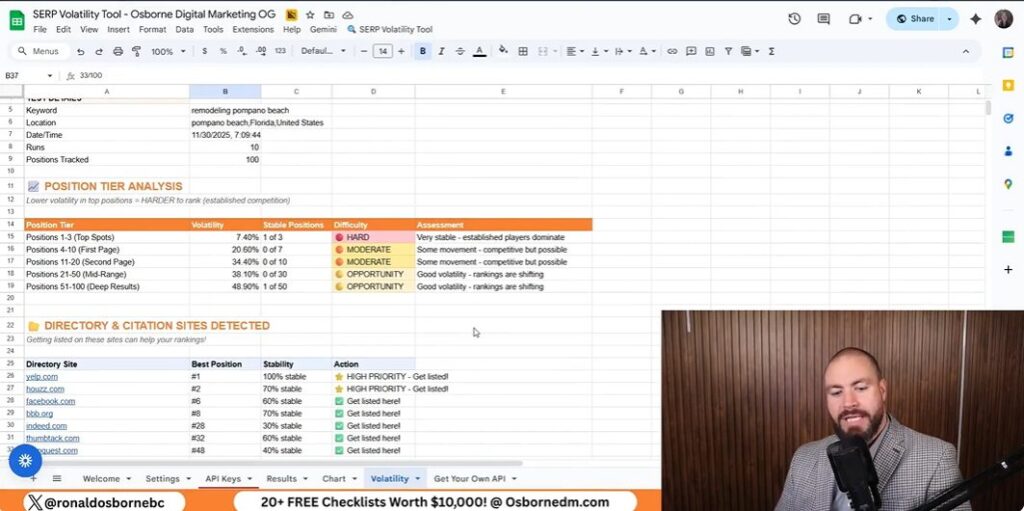
You can grab my SERP Volatility Tool straight from the Osborne Digital Marketing website. The link’s right on my page, and as soon as you open it, the tool’s ready to go. It’s totally free.
When you sign up, you’ll also unlock other handy SEO tools without paying a dime. All I ask is for a quick subscribe or a like - no strings attached.
The tool works with the DataForSEO API. Here’s what you do:
If you use my referral link, you’ll get $1 in credit - that covers the cost of this and other tools. Every account works the same, and that credit basically unlocks everything for free.
| Requirement | Description |
|---|---|
| API Provider | DataForSEO |
| Cost | Free with $1 credit |
| Access | Sign up through my referral link |
After you grab the volatility tool, check out the other resources on my site. There are free tools like a Google Review Scraper and Client Finder.
These let you analyze your online visibility, manage client outreach, and spot new opportunities. No payment, no hassle - just download and start using them.
I use a free SERP volatility tool to track how search results shift up and down. If a ranking jumps from spot 1 to 18, I know the competition’s not that strong.
But if the top results barely budge, it’s probably going to be a grind to outrank them. When I test keywords, I check the volatility ranges to see where the best shot lies:
| Range | Competition Level | Notes |
|---|---|---|
| 1–3 | Very stable | Hard to rank |
| 4–7 | Moderate | Competitive but possible |
| 8–30 | Active | Room for improvement |
I go after weak SERPs first - they’re just easier wins and don’t eat up as much budget. I also check which directories or listings (Yelp, Facebook, etc.) pop up, since that’s a great hint for where to add my own business.
You can get all these tools for free on my Osborne Digital Marketing site. When you make an account, you unlock every tool I’ve put together.
I work pretty closely with a data provider so each user gets enough credit to run these tools without paying. If you sign up through my link, it helps me score better deals for everyone. The more folks join, the more leverage we get.
If you’re a business owner or agency, you can even book a free 15‑minute call to talk strategy. No sales pitch - just real advice and maybe a few ideas you haven’t tried yet.
I use this SERP volatility tool to measure how stable or unpredictable search results look for any keyword or location.
When I spot frequent shifts in ranking positions, I know the results page is weak. That usually means it’s easier to target.
If the top spots hardly budge, getting there takes more time and money. I usually check these movements over ten runs before deciding if a keyword’s worth chasing.
I also keep an eye on which sites pop up a lot, like Yelp, Houzz, or Facebook.
Listing on those directories can bring in extra traffic and maybe a few leads.
| Volatility Range | Competition Level | Opportunity |
|---|---|---|
| 1–3 | Very Stable | Low |
| 4–7 | Moderate | Possible |
| 8–30 | Fluctuating | High |
I lean on the opportunity score to figure out my next move. Scores closer to 0? That’s a tough market. Higher numbers show me where the real openings are hiding.
I built this tool to make it easy for marketers and business owners to gather contact details from Google Maps without breaking the bank. With just a few clicks, I can find businesses in almost any city or industry - roofers, consultants, you name it.
The process is quick and organized. Even if I’m searching in smaller cities, it still works well. Once I set up the industry and location, the tool generates hundreds of leads in just minutes. It’s honestly kind of surprising how fast it pulls everything together.
To help others, I turned this Google Maps Scraper into an easy-to-use system that connects with an external data source. All you need is your email and an API key, and you’re ready to start collecting business info.
This approach is practical for finding potential clients and managing SEO opportunities. It also helps you improve your marketing efforts with accurate data.
I use a Google Maps extractor to grab company data from Google Maps automatically. It pulls details like business name, address, phone number, ratings, and reviews.
The tool also picks up website links and business categories. I can run searches for any city or industry, but it works best if I use the proper capitalization in location names.
| Type of Data | Example |
|---|---|
| Business Name | Best Roofing Co. |
| Phone Number | (305) 555‑0102 |
| Category | Roofing Contractor |
| Rating | 4.7 |
| Reviews | 35 |
The scraper saves me hours of manual research. I can collect up to 1,000 leads for free each month if I stay under the usage limits.
Since it works by location and category, I can focus on any market or city I want. It also helps me spot which prospects already have websites and SEO activity, so I can find potential clients faster.
Key advantages:
I use the scraper to find local SEO clients in industries like roofers, plumbers, or consultants. It also helps web developers and marketers reach businesses that need online services.
Example tasks include:
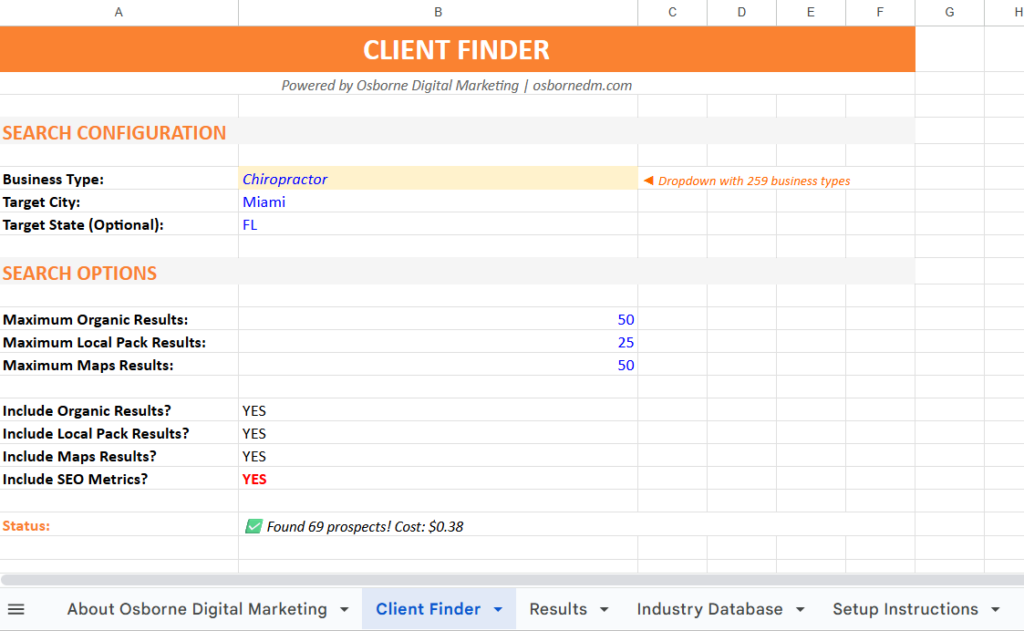
I created the SEO Client Locator so you can find business leads straight from Google Maps. You can search any industry and city you want.
There are over 260 business categories to pick from - roofers, plumbers, consultants, contractors, and more.
To start:
The tool pulls helpful details like business names, websites, phone numbers, ratings, and reviews. You’ll also get extra SEO data, such as traffic and keyword loss.
| Data You’ll Get | Description |
|---|---|
| Business Name | The company listed on Google Maps |
| Website Link | The link on their Google profile |
| Location | City and region shown in Maps |
| Contact Info | Listed phone number |
| Reviews | Star rating and number of reviews |
Once the scraping finishes, all results show up in one table, ready for you to use.
If you want the free marketing resource, head to my Free Marketing Checklist page. You’ll find setup instructions and a link to create your own version of my Google Sheet.
Make sure to:
Once you add your key, you’re set to start collecting leads for free each month.

I’ve listed around 260 business types you can target. You can look for contractors, roofers, consultants, or really any type of company listed on Google Maps.
Use the checklist to pick your favorite categories.
| Example Choices | Description |
|---|---|
| Roofers | Ideal if you offer local marketing services |
| Plumbers | Common trade with strong local demand |
| Consultants | Good for B2B marketing leads |
Mark the categories you want, and the scraper pulls data from those.
Once you’ve chosen the business type, type in the city name and use capital letters for accuracy. For example, it’s Fort Lauderdale, not fort lauderdale.
Here’s the simple format:
This helps the Google Maps scraper collect the right business results from Google Maps.
Now you can decide how many results to collect. Smaller cities might give you fewer leads, while larger ones like Miami or Los Angeles can handle bigger searches.
Suggested limits by city type:
| City Size | Recommended Results |
|---|---|
| Large City | Up to 500 |
| Medium City | Around 250 |
| Small City | 50–200 |
For a quick test, keep it at about 50 to save time. After you set the numbers, click Find SEO Clients to start collecting data.
You’ll see a progress bar tracking your search. When it’s done, you get a full list of leads: business names, websites, phone numbers, locations, and ratings.
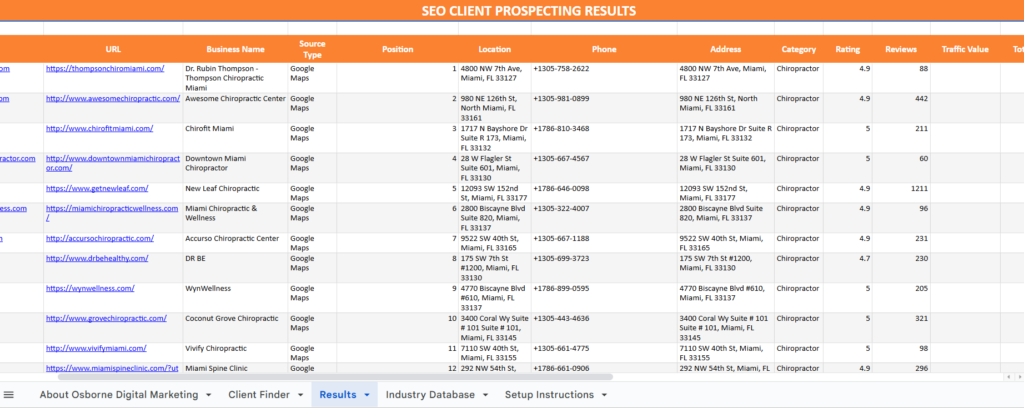
When I finish a scrape, the data loads into a clear table. Each business shows up by name, category, and location.
I can see their phone number, rating, and number of reviews. Each entry includes the link from their Google Business profile, so I can check a company’s site directly.
Here’s a quick look at the main columns you’ll see:
| Field | Description |
|---|---|
| Business Name | The name as it appears on Google Maps |
| Category | The type of service or industry |
| Location | City or region scraped |
| Phone | Public contact number |
| Rating & Reviews | Average user rating and count |
| Website Link | URL from their business profile |
This layout helps me spot prospects worth contacting. I can compare similar businesses in one view.
When I start a scrape, a progress bar pops up to show what’s happening. The status might say things like searching local results or collecting organic listings.
I watch the prospect count climb as the tool processes each result. If a message shows an estimated cost, I don’t stress - it’s just a rough guess.
Any small amount that appears is an estimate, but the tool still lets me collect a bunch of results for free if I stay within the limit.
Once the business data loads, I check the SEO info next to it. This section shows metrics like site traffic and lost keywords.
These numbers help me spot businesses that might need digital marketing support. I usually check:
By looking at these metrics, I get a sense of which prospects are good candidates for outreach or optimization offers.

I start by heading to the Data for SEO link in the setup tab. After signing up, I get a small credit balance, which lets me use the tool right away.
The platform gives me an API key that I copy straight from my account. This key connects my spreadsheet to the Data for SEO system, powering the scraping and data collection.
Once I have the key, I open the sheet and go to the setup area. I type my email address and API key into the right fields.
It’s smart to make a personal copy of the sheet first, so I can edit it without messing up the shared version. After that, the sheet links to my account and starts pulling live data when I run searches.
When I sign up, I get a $1 credit to test things out. That covers scraping about 1,000 prospects for free if I skip the extra SEO metrics.
Each request costs just a few cents, but more detailed data like traffic or keyword loss uses a bit more. Here’s a quick look at typical costs:
| Task | Approx. Cost | Notes |
|---|---|---|
| Basic Maps scraping | Free up to $1 credit | ~1,000 listings |
| Additional results | ~$0.08 per 100 | Varies by region |
| With SEO metrics | Slightly higher | Uses more API units |
I usually check my credit balance before starting new runs, just to make sure everything works smoothly.
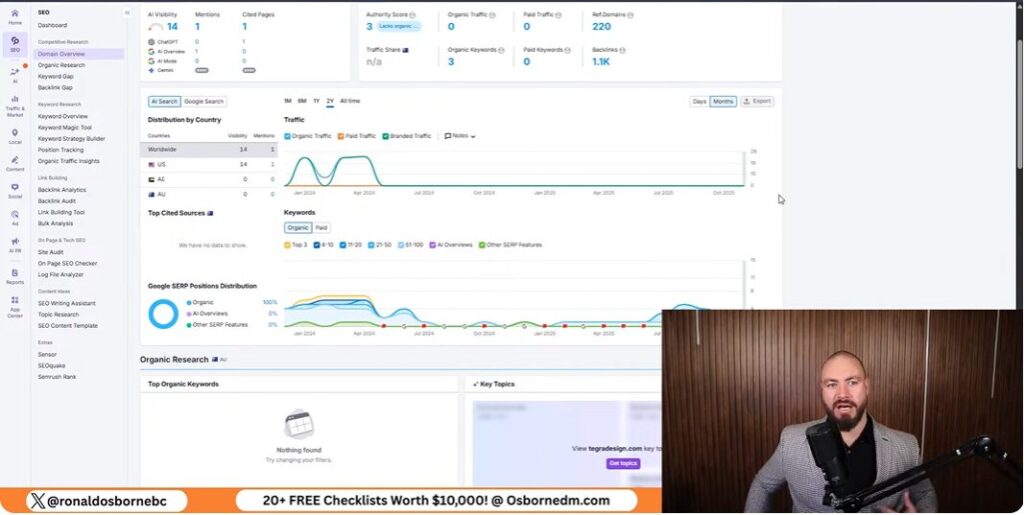
I use the scraper to pull data from over 260 business categories on Google Maps. This covers almost every kind of business - roofers, plumbers, consultants, contractors, you name it.
I just pick the industry I want, and the tool grabs business names, contact details, and other handy info.
The scraper gives me clear data for each lead - website URL, category, location, phone number, and ratings. That makes outreach a lot simpler.
I always make sure location names are properly capitalized (like “Fort Lauderdale”) before running searches. Google really does care about how city and state names are written.
I focus on geo-specific targeting to find leads right where I want them. By mixing industry keywords with exact city names, I get more relevant data and waste less time. Here’s a setup table that helps me stay organized:
| Step | Action | Example |
|---|---|---|
| 1 | Choose industry | Roofers |
| 2 | Add city name | Fort Lauderdale |
| 3 | Select data type | Google Maps results |
Large cities like Miami or Los Angeles have more listings, so I set the scraper to pull around 500 results at once. Smaller cities, like Fort Lauderdale, usually give fewer businesses, so I keep searches to about 200–250 results.
I adjust the result count based on city size. This keeps things fast and the data clean, whether I’m working with a big metro or a smaller market.
When scraping, I often run into issues from small mistakes in how the search terms are entered. For example, city names must start with capital letters.
If I type “fort lauderdale” instead of “Fort Lauderdale,” the scraper might not return data. Setting realistic search limits matters too - small cities may only give a few hundred results, while big cities can handle more. If I go too high, the scraper slows down or misses data.
I always create a copy of the working sheet before editing. I don’t give others access to my main files.
This protects the formulas and settings I’ve set up. Once the scraper pulls data, I name each sheet clearly, like Fort Lauderdale Roofers or Miami Contractors.
If a sheet doesn’t update or load correctly, I check the following:
| Problem | Likely Cause | Quick Fix |
|---|---|---|
| Data not loading | Editing original sheet | Create and edit a copy |
| Missing results | Wrong search name or limit | Review search inputs |
| File errors | Cached formulas | Refresh or duplicate the sheet |
I make sure the scraper connects with the correct API by copying the API key exactly as shown in the dashboard. One typo, and I’m stuck with connection errors.
To avoid grabbing the wrong data, I double-check that industry categories and city names match what I want. I also only turn on SEO metrics if I actually need them.
If results look weird, I re-run the search with a smaller limit or turn off optional metrics. That usually keeps things accurate and helps me spot errors early.
I’ve set up this Google Maps Scraper tool so anyone can collect data from Google Maps without paying for small batches. Just follow each step - add the industry, location, and your API key.
Here’s what I focus on:
Result Fields:
| Data Collected | Description |
|---|---|
| Business Name | The official listing name |
| Category | Industry type (e.g., roofer, consultant) |
| Phone Number | Direct contact number |
| Website/Domain | Link to the business website |
| Ratings & Reviews | Basic performance metrics |
Once I finish a scrape, I get a full list of businesses with all their contact details. After linking the API key, the process runs on its own and brings in hundreds of results for outreach or analysis.
Picture this: Years ago I was hunting for my first bookkeeping client and nearly signed up for a $2,000 ad package that would've cleaned out my bank account. Instead, I stumbled upon a scrappy, data-driven way to make connections (with barely any money). If your budget's tighter than your aunt's perm, trust me - you've got options. Let me walk you through the wildcard strategies on how to get bookkeeping clients that actually worked for me, plus a few landmines I stepped on so you don’t have to.
TL;DR: You don’t need a fat marketing budget to build a solid base of bookkeeping clients - free lead tools, savvy SEO, and targeted outreach deliver way better results than most paid ads. Steer clear of high-cost, low-ROI tactics and keep it personal (and a bit unconventional).
If you’re just starting out as a bookkeeper or looking to grow your client base, I want to share the exact strategies that have worked for me - and for the bookkeepers I’ve coached. My earliest client wins didn’t come from fancy software or expensive ads. They came from raw persistence and a willingness to do what others wouldn’t: reach out, follow up, and have real conversations. Here’s how I landed clients, and how you can too, without breaking the bank.
When I first began, I didn’t have a big budget or a slick website. What I did have was grit. I made a habit of reaching out to local businesses - dentists, roofers, plumbers - by phone and email. The key was personalization. Forget generic templates. I took the time to research each business and referenced something specific about them in my message. This approach got me replies when mass emails didn’t.
“Personalized emails and calls outpace generic templates - everyone appreciates a real conversation.”
One mistake I’ll never repeat is blasting out hundreds of emails at once, hoping something would stick. It’s a waste of time and energy. Instead, I focus on small, targeted lists - think 50 to 200 leads in a specific niche and area. For example, I might target “dentists in Fort Lauderdale” or “roofers in Miami.” This lets me tailor my outreach and stand out from the noise. Quality always beats quantity.
Here’s a shameless plug, but it’s truly a game-changer: my free SEO Client Finder tool. I built this to help bookkeepers (and other service pros) find leads fast and cheap. Using this tool, I once generated 72 prospects for just 12 cents. No joke. Here’s how it works:
This method is far superior to buying expensive lead lists or running ads when you’re just starting out. You can get hundreds of targeted leads for a couple of bucks, and you control exactly who you contact.
Once you have a few clients, invest in local SEO. Ranking your bookkeeping business in Google’s map pack and organic results brings in high-intent leads - people actively searching for your services. I’ve seen ROI of $5 to $8 for every $1 spent on SEO, compared to $1.25 for paid ads. Social media ads (Facebook, Instagram) are cheaper but bring lower-quality leads. LinkedIn is solid for B2B, but costs more. TikTok? Don’t waste your time there for bookkeeping clients.
Bottom line: Persistence, personalization, and smart tools are your best friends for landing bookkeeping clients - especially when you’re on a budget.
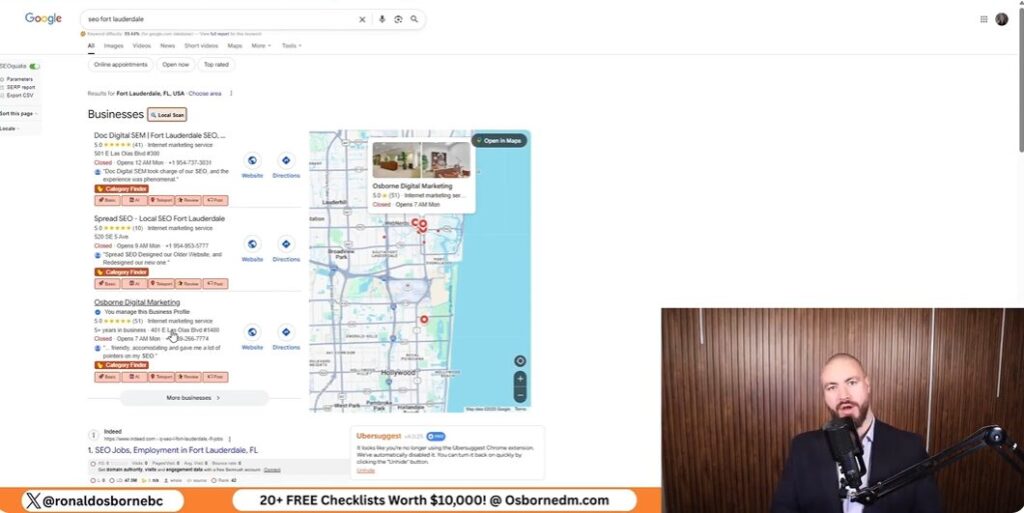
When I started my Fort Lauderdale branch, I knew I didn’t want to burn cash on ads just to get my first clients. Instead, I doubled down on local SEO - and it paid off big time. My business now ranks in Google’s map pack for “bookkeeper Fort Lauderdale” and related searches. The result? Dozens of leads rolling in each month, all without spending a dime on ads. If you’re looking for the fastest, most cost-effective way to become the top bookkeeping professional in your area, let me walk you through exactly how I did it - and how you can, too.
Here’s the truth: Paid ads are a hamster wheel. You pay, you get leads. Stop paying, and the leads dry up instantly. With local SEO, once you rank, you stay there. You’ll keep getting calls and emails from interested clients for pennies on the dollar compared to what you’d spend on Google Ads or Facebook. In my experience, SEO delivers the highest ROI for bookkeepers. For every $1 I’ve invested in SEO, I’ve seen $5 to $8 back. Compare that to the razor-thin margins of paid ads, and the choice is obvious - especially if you’re on a tight budget.
“SEO has the highest ROI in client acquisition for bookkeepers - my numbers don’t lie. If you want to be the go-to in your area, local SEO is where you start.”
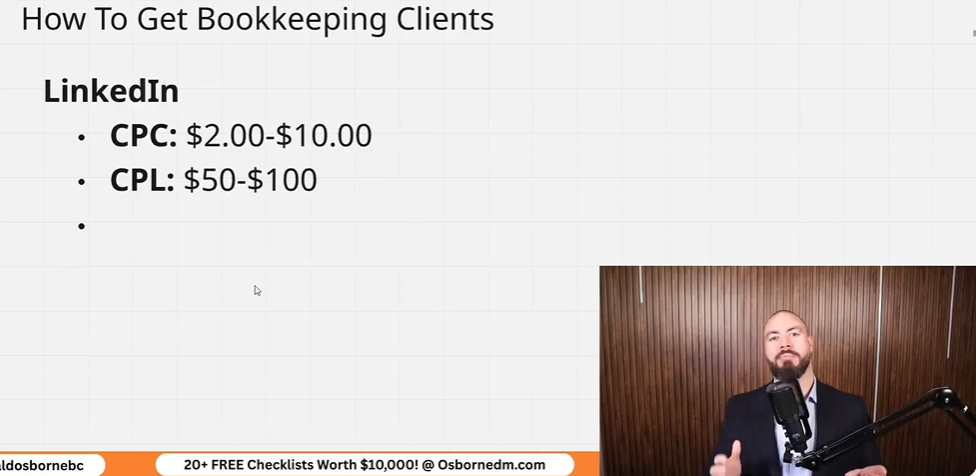
When it comes to landing bookkeeping clients, the platform you choose can make or break your budget - and your sanity. I’ve tested nearly every method on how to get bookkeeping clients out there, and I want to break down the real numbers so you can make the smartest decision for your business. Here’s what you need to know about paid ads versus organic strategies, based on my direct experience helping bookkeepers grow their client lists.
Let’s start with Google Ads. In the bookkeeping space, you’re looking at $55–$75 per click. Yes, you read that right - per click, not per lead. If you’re running a campaign with a $2,000 monthly budget, you might only get 30–35 clicks. And not every click turns into a lead, let alone a client. In my experience, you’ll often pay $60–$80 per qualified lead - sometimes more, depending on your targeting and competition.
While Google Ads deliver high-intent traffic (people actively searching for bookkeeping help), the cost can be prohibitive for most solo bookkeepers or small firms just starting out. If you’re not careful, you can burn through your budget in days without a single conversion.
Facebook and Instagram ads are much more affordable on the surface. You might pay $3–$10 per click and $15–$30 per lead. Sounds great, right? The catch: these leads are often “cold.” People scrolling through social media aren’t actively looking for a bookkeeper. In my tests, it usually takes three to five Facebook leads to land one actual client, compared to Google’s higher conversion rate.
So, while you’ll spend less per lead, you’ll need more leads to close a deal. If you’re tight on cash, it’s tempting - but be prepared for a lot of tire-kickers and time-wasters.
LinkedIn is my go-to for targeting high-value niches. The cost per click is higher - $8–$15 per click - and leads can run $40–$80 each. But here’s the upside: you can laser-focus your targeting by industry, company size, and even job title. If you want to work with law firms, dentists, or tech startups, LinkedIn lets you reach decision-makers directly.
When I run LinkedIn campaigns for bookkeepers, I often see a conversion rate of 10–15% - much higher than Facebook. If you’re willing to invest, this is where I’d start with paid ads, especially if you have a clear niche.
It’s tempting to try TikTok because the cost per click is often under $1. But after running multiple tests, I can say with confidence: don’t bother. The audience just isn’t looking for bookkeeping services. I’ve never landed a quality client from TikTok, and neither have any of the bookkeepers I coach. Save your time and money for platforms that actually convert.
Now, let’s talk organic. With local SEO, I’ve seen bookkeepers spend $500–$1,000/month and generate dozens of leads- often at a $5–$8 return for every $1 spent. Once you rank, those leads keep coming in without the constant drain of ad spend. Plus, the intent is sky-high: people searching “bookkeeper near me” are ready to hire.
Bottom line: If you want sustainable, high-quality leads, organic strategies like SEO and my free client finder tool are unbeatable for ROI.

If you’re like me, you probably cringe at the idea of “hard selling” your bookkeeping services on social media. The truth is, most people don’t want to be sold to - they want to learn, connect, and trust before they ever consider hiring you. Over the years, I’ve found that building trust through educational content, strategic freebies, and real community engagement is far more effective than aggressive pitches. Here’s how I’ve done it, and what I’d recommend for any bookkeeper looking to land quality clients without feeling pushy.
The fastest way to get attention - and respect - is to teach, not sell. I regularly post simple, actionable tips on my social channels: think “3 ways to prep your books for tax season” or “How to spot cash flow leaks.” These posts don’t just show off your expertise; they help business owners solve real problems. Every time I offer a free 15-minute consultation or share a downloadable checklist (like my client finder tool), I see a spike in DMs and email inquiries. People appreciate the no-strings-attached help and are far more likely to remember you when they need a bookkeeper.
Nothing builds street cred faster than sharing real results. I make it a habit to post short testimonials from happy clients - just a sentence or two, with permission - on my Facebook page and LinkedIn profile. I also share quick “before and after” stories in relevant groups. For example, “Helped a local dentist recover $8,000 in missed deductions last quarter.” These aren’t bragging - they’re proof that you get results. Over time, these stories create a reputation that speaks louder than any sales pitch.
Here’s a secret: most of my best referrals have come from being active in bookkeeping and small business support communities - not from cold outreach. I don’t just lurk in these groups; I answer questions, share resources, and celebrate others’ wins. Whether it’s a Facebook group for local entrepreneurs or a LinkedIn group for service providers, I show up consistently and genuinely. When someone asks for a bookkeeper recommendation, members tag me because they’ve seen my helpful posts. That’s how referrals happen - quietly, organically, and without the hard sell.
By focusing on education, sharing real results, and being an active community member, you’ll build trust that leads to clients - without ever feeling like a pushy salesperson.
Looking back at my journey helping bookkeepers and building my own businesses, I’ve learned that failing fast is a gift - if you take the lesson and move on. Early on, I fell into the trap that catches so many: dumping thousands of dollars into mass advertising campaigns, hoping sheer volume would bring in clients. I tried Google Ads, Facebook campaigns, and even dabbled in platforms like TikTok, thinking more eyeballs meant more business. The reality? Most of those dollars vanished with little to show for it. Bookkeeping is a trust-based service, and mass ads rarely build that trust or attract the right kind of client.
Here’s the hard truth: targeted, personal outreach is simply smarter. When I shifted my focus to reaching out directly to business owners - armed with a list of prospects tailored by industry and location - I saw a dramatic difference. Instead of chasing every possible lead, I was connecting with people who actually needed bookkeeping help and were ready to talk. The conversion rate skyrocketed, and my cost per client acquisition dropped to a fraction of what I’d spent on broad ads.
Another lesson: not all platforms are created equal. TikTok is a great place for entertainment and brand awareness, but it’s not where serious business owners go to find a bookkeeper. I wasted time and money testing ads there, only to realize the audience just wasn’t right. If you’re a bookkeeper, your ideal clients are probably not scrolling TikTok looking for help with their books. Instead, focus your energy on platforms where business owners are actively seeking services - think LinkedIn, Google, and even niche Facebook groups. The intent is higher, and the leads are warmer.
Automation is another area where I learned to tread carefully. It’s tempting to automate every part of your outreach - emails, messages, even follow-ups. But here’s what I found: automation can get your foot in the door, but it can’t replace a genuine, human connection. The best results always came when I picked up the phone and made a quick, personal follow-up call. That simple act of reaching out directly, showing you care, and answering questions in real time builds trust faster than any automated sequence ever could.
In short, I’d never waste money again on mass ads or platforms with weak lead intent. I’d skip automation that removes the human touch. Instead, I’d double down on targeted, personal outreach and genuine follow-up. These are the strategies on how to get bookkeeping clients that consistently deliver real, high-quality leads. If you’re just starting out or looking to grow, learn from my mistakes - fail fast, pivot quickly, and focus your time and budget where it counts. Your client list (and your bank account) will thank you.
You know those moments when you stumble on something so effective, it feels like cheating? That was me the day I found a free sheet that not only found SEO clients losing ground in real time, but handed me their phone numbers. I’ll admit it: I felt like Indiana Jones when he grabs the idol, but instead of booby traps, there were clients practically begging to be found. Here’s me, Ronald Osborne, showing you how to get SEO clients using this tool - missteps, quirks, and all.
TL;DR: Skip the cold lists and wasted outreach. Use the SEO client finder tool to spot and contact prime prospects - especially those who’ve tasted SEO but are falling behind. If you follow my weird-yet-effective process, you’ll close more clients, work smarter (not harder), and maybe even enjoy it.
Let’s be real: traditional SEO prospecting is a grind. If you’ve ever spent hours scraping Google, cold emailing generic lists, or manually checking business websites for obvious SEO issues, you know what I mean. The whole process feels dry, robotic, and honestly - soul-sucking. You’re just another stranger in someone’s inbox, pitching services they’ve probably heard about a hundred times. There’s no spark, no real insight, and rarely any actual value delivered up front. That’s my honest beef with most SEO lead gen methods - they’re stuck in the past, and it shows.
For years, I bounced between paid tools and “secret” prospecting systems, hoping to find something that didn’t make me feel like a spam bot. Most of the time, I just ended up with a lighter wallet and a heavier dose of skepticism. The paid stuff promised the world, but the results were always underwhelming - outdated data, missing contact info, or lists full of businesses that didn’t even need SEO. It was like buying a ticket to a movie and realizing you’ve already seen it (and didn’t like it the first time).
Here’s where things took a weird turn. I wasn’t even looking for a new tool when I stumbled onto the Osborn Digital Marketing free checklist sheets. I found them by accident, buried in a random SEO Facebook group thread. Someone casually mentioned a “client finder sheet” that was free and actually worked. I’ll admit - I rolled my eyes. Free tools in SEO are usually just lead magnets or stripped-down versions of paid products. But curiosity got the better of me, so I clicked through.
My first impression? Total skepticism. The site looked almost too simple. No flashy sales pitch, no endless upsells - just a list of free resources and a big button for the SEO Client Finder. I thought, “There’s no way this is legit. What’s the catch?” But I figured I had nothing to lose, so I downloaded the sheet and started poking around.
Here’s the wild part: the Osborn Client Finder Sheet wasn’t just free - it actually outperformed a lot of the paid tools I’d tried. It pulled in real-time data, let me filter by industry and location, and even gave me direct contact info for prospects. The kicker? It showed me which businesses were actively losing rankings - not just random companies, but ones that had already invested in SEO and were now slipping. That’s the sweet spot for outreach.
What really blew me away was how effortless it was. No complicated setup, no credit card required, just a simple API connection and a few clicks. In less than a minute, I had a list of high-potential leads, complete with lost keyword data and phone numbers. It felt almost unfair compared to the hours I’d wasted on other platforms.
Sometimes, the best tools aren’t the ones with the biggest price tags or the fanciest dashboards. They’re the ones that quietly deliver results, no strings attached. That’s exactly how I stumbled onto the Client Finder Sheet - and why I haven’t looked back since.

When I first started searching for SEO clients, I wasted a lot of time chasing businesses that either didn’t understand SEO or weren’t ready to invest. Over time, I discovered a much smarter way - using data to pinpoint businesses that are already losing rankings and, as a result, are primed for help. Here’s exactly how I do it, step by step, using a free tool from Osborn Digital Marketing that makes the whole process almost effortless.
First, head over to the Osborn Digital Marketing website. Scroll down until you find the SEO Client Finder sheet. This is the main resource you’ll use to uncover businesses that need SEO services. The tool is 100% free, and you’ll also find other helpful checklists and resources on the page.
To get the tool working, you’ll need to set up the Data For SEO API. It’s super simple - just enter your email and API key in the setup tab. There’s an affiliate link provided (which gives you a free bonus dollar), and using it helps our community get better deals in the future. No extra cost to you, and it’s a win-win for everyone.
With the API ready, select from 209 different business categories. Whether you want to target roofers, plumbers, dentists, or any other local business, you can filter by industry and location - say, “roofers in Fort Lauderdale, Florida.” I usually keep my searches to a few hundred prospects at a time for easier management.
Click “Find SEO Clients” and let the tool do its magic. In less than a minute, you’ll have a list of businesses with real-time SEO data. Head to the results tab and filter out big directories or irrelevant sites (like Yelp, BBB, or Reddit) to save on API costs. Then, click “Get SEO Metrics for Selected” to pull in detailed stats for each business.
The results sheet gives you a goldmine of info:
I focus on businesses that have lost a significant number of keywords. These are companies that have already invested in SEO or at least have some traction - but something’s broken, and they’re slipping. They’re much more likely to see the value in your services than brand-new businesses.
When prospecting, I look for businesses that aren’t at the very top or bottom of the Google Map Pack. For example, a roofer with 68 reviews sitting at position 13 (like “Dolphin Roofing” in Fort Lauderdale) and nearly 100 lost keywords in the past month is a perfect candidate. They’ve had some success, but they’re losing ground - and their competitors are within reach.
The tool even provides phone numbers for direct outreach. I always call first - if I can’t reach them, I’ll use email or their contact form. When I reach out, I highlight exactly what they’re losing and how close they are to overtaking competitors. This approach positions me as a problem-solver, not just another salesperson.
By using this data-driven method, I consistently find businesses that truly need SEO help - and are ready to take action.
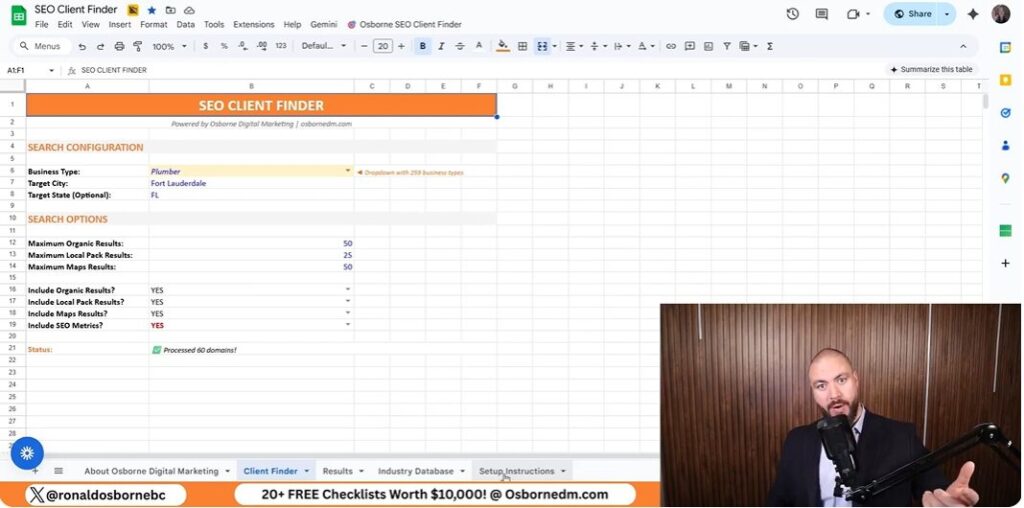
Let’s get straight into the nuts and bolts of how to get SEO clients using the SEO Client Finder Tool from Osborn Digital Marketing - and why it’s not nearly as technical (or intimidating) as it sounds.
First, head over to the Osborn Digital Marketing website. You’ll see a bunch of free resources and checklists, but don’t get distracted - scroll all the way down until you spot the SEO Client Finder sheet. This is the main tool you’ll use to uncover businesses that are losing SEO ground and are ripe for outreach. Download the sheet to your device. The interface is refreshingly simple: think of it as a supercharged spreadsheet, not some complicated dashboard.
This next part sounds techy, but it’s honestly a breeze. You’ll need a Data For SEO API key to pull in real-time data. Here’s how I did it:
That’s it. No coding, no weird software installs - just copy, paste, and you’re ready to roll.
Now for the fun part: picking your target industry. The tool lets you choose from 209 different business categories. Whether you want to find roofers in Fort Lauderdale, dentists in Dallas, or even niche markets, you’re covered. I usually work with roofers, so I selected that category and set my location to Fort Lauderdale, Florida. You can search up to 1,000 prospects at once, but I recommend starting with a few hundred to keep things manageable.
Click the “Find SEO Clients” button and let the tool do its thing. In less than a minute, you’ll have a list of prospects complete with key SEO metrics. But here’s where a little sanity check goes a long way: filter out the sites you don’t want - like Yelp, Reddit, BBB, Forbes, and Gaff. These aren’t real prospects and will just clutter your results (plus, filtering them saves you a few cents on API costs). Simply untick these domains in the results tab.
With your filtered list, hit “Get SEO Metrics for Selected.” The tool will pull in valuable columns like:
I focus on businesses that have lost a chunk of keywords recently. These are the folks who know what SEO is and are feeling the pain of dropping rankings. For example, a roofer with 68 reviews and nearly 100 lost keywords in the last month is a prime candidate - they’ve tasted SEO success but are slipping, making them much more likely to respond to a well-timed outreach call.
The sheet even gives you phone numbers for direct contact. I always recommend calling first - nothing beats a real conversation when a business is losing visibility and needs help fast.
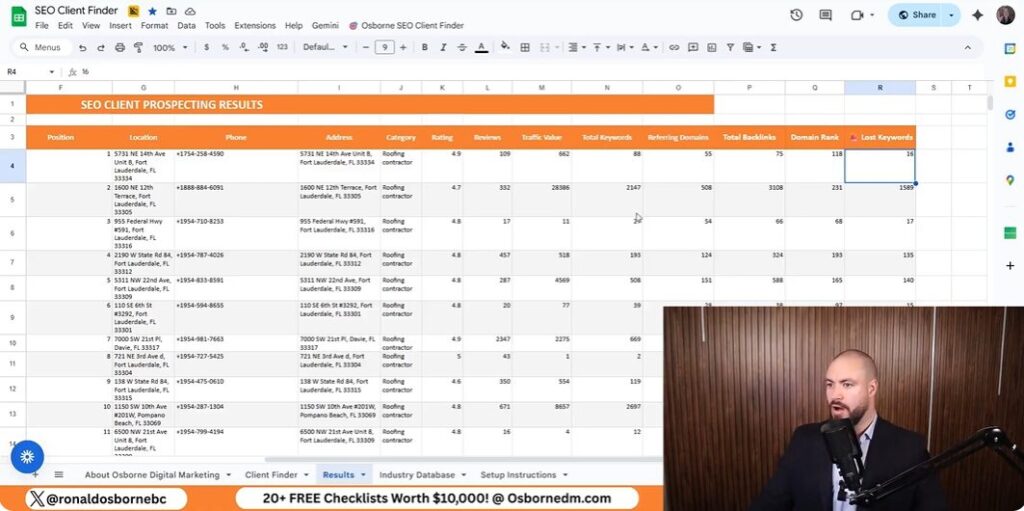
Let’s get real: most SEO tools drown you in metrics, but only a handful actually matter when you’re hunting for clients who need your help right now. After running the Osborn SEO Client Finder, you’ll see a bunch of columns - traffic value, total keywords, lost keywords, referring domains, backlinks, domain rank, and more. But here’s the truth: I only care about a select few, and I’ll explain exactly why.
Honestly, I ignore most of the other columns - referring domains, total backlinks, and domain rank - at this stage. They’re useful for audits, but not for fast prospecting.
Here’s why I obsess over the lost keywords column: it’s the clearest signal that a business is hurting and likely to be receptive to your pitch. If a site is bleeding keywords, they’re losing visibility, leads, and revenue - often without even realizing it. When you point this out, you instantly position yourself as someone who can solve a problem they didn’t know they had.
Most agencies chase after businesses that have never ranked. That’s a tough sell. I target those who’ve already tasted SEO success but are slipping. They’re more motivated, they understand the value, and they’re often desperate for a fix.
Let me show you how this works in the wild. In my last search, I found a roofing company - let’s call them “Dolphin Roofing” in Fort Lauderdale. They’re sitting at position 13 in the Google Map Pack, with 68 reviews. Not at the top, not brand new - right in that sweet spot. But here’s the kicker: they lost almost 100 keywords in the last 30 days.
“Hey, I noticed you’ve lost 91 keywords this month. That’s a lot of potential customers slipping away. With a few tweaks, you could easily move up and grab those leads back - especially since your top competitor only lost 16.”
That’s my opener. It’s specific, urgent, and positions me as the solution.
Instead, I zero in on those in the middle - established, but slipping. That’s where the real opportunity lies, and why “lost keywords” is my go-to metric for effortless client acquisition.
Let’s get real for a second: nothing beats the impact of a live conversation, even if you’re dialing in from the other side of the world with an Aussie accent like mine. After years of prospecting, I’ve learned that calling potential SEO clients first - before sending a single email - makes all the difference. Sure, it’s nerve-wracking. Yes, my accent sometimes throws people off. But the power of a direct, human conversation trumps any cold email or LinkedIn message every single time.
Here’s why I always pick up the phone first: when you call, you’re not just another faceless pitch in their inbox. You’re a real person, genuinely interested in their business. And thanks to the Osborn SEO Client Finder, I’m armed with hyper-relevant data - like their current map pack position, how many keywords they’ve lost, and their review count. This means I can open with, “Hey, I noticed Dolphin Roofing dropped nearly 100 keywords this month and slipped to position 13 in the map pack. I help businesses like yours recover lost rankings - would you be open to a quick chat?” That kind of specificity immediately sets me apart from generic sales calls.
But let’s be honest: not every call goes smoothly. There was one time my accent nearly cost me a deal. I was speaking with a Florida-based roofer, and halfway through my pitch, he interrupted, “Wait, where are you calling from? Are you even local?” I realized then that some American clients might be wary of outsiders, especially in industries like roofing where trust is everything. What I learned? Always address it up front. Now, I’ll say, “You might notice my accent - I’m originally from Australia, but I work with businesses across the U.S. and have helped several right here in Fort Lauderdale.” That transparency builds trust and diffuses any awkwardness before it can derail the conversation.
Of course, not everyone answers their phone, and that’s where cold email comes in as my trusty backup. The trick is to make your outreach feel as human as possible. I always reference the exact data points I found - like their lost keywords or map pack position - so they know I’ve actually done my homework. I avoid templates that sound robotic or spammy. Instead, I write as if I’m continuing the phone conversation: “I tried reaching you by phone because I noticed your site recently lost visibility for 91 keywords. I have a few ideas that could help you regain those rankings quickly - would you be open to a quick call?”
When it comes to choosing who to pitch, I focus on what I call ‘no man’s land’ clients. These are businesses that aren’t brand new (so they have some reviews and history), but they’re not dominating the map pack either. They’re stuck in the middle - like Dolphin Roofing with 68 reviews and a position just outside the top 10. These businesses have already invested in SEO, experienced some success, and now feel the sting of lost rankings. They’re motivated, pre-qualified, and much more likely to see the value in what I offer.
In the end, my process on how to get SEO clients is simple but powerful: use real-time data to identify the right prospects, reach out with a personal touch (accent and all), and position myself as the solution to their very real, very urgent problem. Whether you’re a seasoned SEO pro or just getting started, don’t underestimate the power of a well-timed call, a relevant message, and a little bit of human awkwardness. That’s how I turn cold leads into loyal SEO clients - one conversation at a time.
Here’s a confession - I used to think tossing my business info onto as many sites as possible was ‘good SEO’. Turns out, it was like shouting in a crowd with zero listeners. After years of face-palming and wasted afternoons, I built a laser-focused system that finally clicked - and today I’ll spill those hard-won secrets. Let’s untangle the mess, share a quick roofing anecdote, and talk about the massive leap a real, handcrafted database of business listing sites can deliver.
TL;DR: Stop spamming random directories. Use a targeted list of business listing sites tailored to your industry and region to make local SEO work for you - saving time, money, and sanity. Download my proven sheet for a shortcut to results.
When I first started Osborne Digital Marketing, I believed what many business owners still do: the more directories you list your business on, the better your results. I spent hours adding my business to every site I could find, thinking it would skyrocket my rankings and bring in a flood of leads. But here’s the truth I learned the hard way - randomly listing your business everywhere doesn’t equal more traffic. In fact, it can do more harm than good.
Let me share a quick story. Early on, I submitted my business to dozens of generic directories. The result? My inbox filled up with spam, my phone rang with sales pitches, and my website traffic barely budged. Worse, I started noticing inconsistent business information across listings - some had my old address, others a misspelled business name. Google picked up on these discrepancies, and my local rankings actually dropped. I realized that quality and relevance matter far more than sheer quantity.
Not all directories are created equal. There’s a big difference between a generic site and one tailored to your industry. For example, as someone who’s helped roofers, plumbers, and carpet cleaners rank for tough keywords, I’ve seen firsthand that industry-specific listings (like roofing associations or trade directories) carry more weight with both Google and potential customers. These sites are trusted, targeted, and often deliver real leads - not just empty clicks.
Over five years, I’ve personally built and verified a list of 2,500 business listing sites, organized by industry and region. This isn’t just a random collection - it’s a curated resource that shows why fewer, relevant listings work best. For roofers, for example, I’ve identified 93 high-impact directories (national and state-specific) that actually move the needle. Listing on every site you find is not only unnecessary, it’s counterproductive.
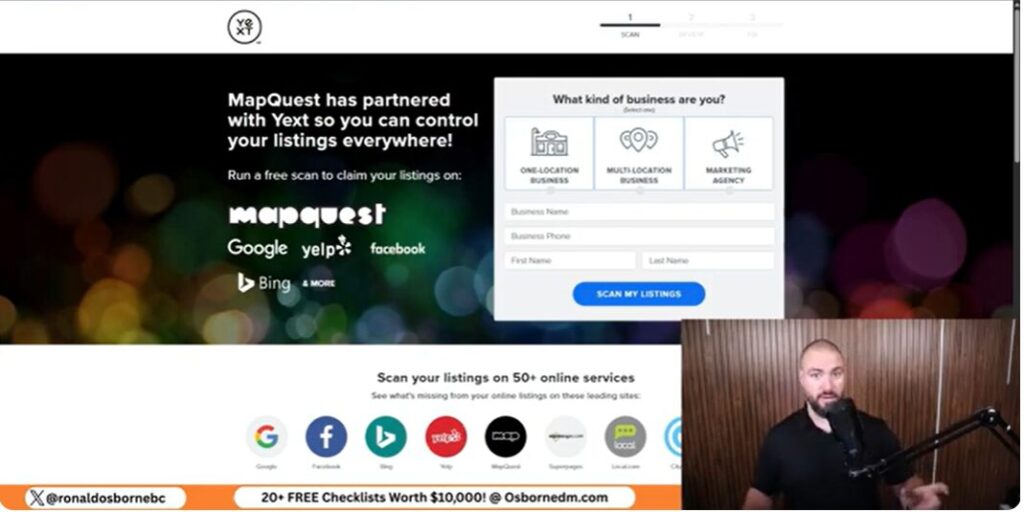
One of the biggest mistakes I see is businesses letting their information go stale or inconsistent across directories. Even a small typo or an old phone number can confuse search engines and hurt your rankings. That’s why I always recommend using a tracker or index to monitor your listings. Keeping your NAP (Name, Address, Phone) data consistent is crucial for local SEO success.
“Listing everywhere got me nowhere - except for more spam and headaches. Focusing on the right sites changed everything.” - Ron Osborne
In summary, don’t fall for the directory myth. Targeted, up-to-date listings on industry-specific sites will always outperform a scattergun approach. My experience - and the data - prove it.
After five years of deep work in the trenches of SEO and business listings, I’ve seen firsthand what separates a listing that drives real leads from one that just sits there collecting digital dust. Let’s break down the anatomy of an effective business listing - and reveal the backlink bonus that most people overlook.
Free listings are a great starting point and make up the majority of my 2,500-site collection. They get your business on the map, literally and figuratively. But paid listings often come with perks: featured placement, extra categories, or even direct lead generation. Some aggregators charge $15–$50, but they can push your info to dozens of partner sites, multiplying your visibility. The choice depends on your budget and goals, but don’t ignore the value of a well-placed paid listing in a competitive niche.
It’s not just about digital shelf space. When your business is listed accurately and widely, you show up in more searches - especially “near me” queries. I’ve seen clients in roofing and plumbing get calls within days of updating their listings. Each citation is another door for customers to find you, and the trust signals from consistent listings help you outrank competitors.
Listing your roofing business on HomeAdvisor or Gaff isn’t just about exposure. These sites are trusted by both Google and customers. Being present here can mean instant credibility and a steady stream of leads - especially when combined with niche, state-specific directories from my sheet.

Over the past five years, I’ve spent thousands of hours building, testing, and refining business listing site lists for nearly every local trade you can imagine - roofers, plumbers, electricians, HVAC pros, landscapers, and more. What I discovered is that most people get business listings wrong because they focus on quantity over quality. Let me show you why industry-specific directories are the real game-changer for lead generation and local SEO.
When I first started, I thought blasting my business onto every generic directory would boost rankings. But after tracking hundreds of campaigns, I realized that hyper-focused, industry-specific directories consistently outperformed the big, generic ones. For example, a listing on a niche site like Roofers, Coffee Shop, Plumbing, Web, drove more targeted traffic and higher conversion rates than a dozen listings on broad platforms.
Take roofing as a case study. I’ve curated a list of 93 roofing-specific directories, including both national and state-level associations, review sites, and trade platforms. These aren’t just random links - they’re places where real customers look for roofing services. When my clients claim these listings, they see a noticeable jump in both search visibility and direct leads. It’s not just about being everywhere; it’s about being in the right places.
Here’s the secret: Google and other search engines value relevance. When your business is listed on directories that are tightly aligned with your industry, it sends a strong trust signal. These sites often have higher domain authority in their niche, and the backlinks you get are far more valuable for SEO. Plus, customers searching these directories are already primed to hire someone in your field, so conversion rates skyrocket.
Every time you add your business to a trusted, industry-specific directory, you’re not just creating another citation - you’re building your reputation in the eyes of both search engines and real customers. Over time, these targeted citations compound, boosting your domain authority and helping you outrank competitors who rely on generic, low-value listings.
Don’t fall for the myth that more is always better. I’ve seen businesses waste time submitting to massive, outdated lists with little to no impact. Instead, focus on the directories that matter most in your industry. For roofers, that’s the 93-site edge. For plumbers, electricians, and others, I’ve built similar, highly curated lists. When you’re visible where your ideal customers actually search, you get more qualified leads and build lasting authority.

Let’s be honest - nobody gets business listings perfect on their first try. Even after five years and thousands of listings, I’ve made my fair share of blunders. The good news? Every mistake is fixable, and I’ve developed a toolkit of quick fixes that will save you time, money, and headaches. Here’s what I’ve learned from the trenches of SEO and business listings.
There was a time I accidentally listed a client’s roofing business with a typo in the phone number. Another time, I used an old URL that redirected to a competitor. And yes, I’ve missed responding to reviews - sometimes for months. These slip-ups happen to everyone, but they can hurt your local SEO and credibility if left unchecked.
Google Business Profile (GBP) is the kingpin of local search. In 2025, Google is doubling down on local intent and user-generated content. If your GBP info doesn’t match your other listings, or you’re ignoring reviews, you’re leaving money on the table. Reviews aren’t just for show - they directly impact your rankings and trustworthiness. Make it a habit to check your GBP weekly and respond to every review, good or bad.
Automation can be a lifesaver, but only if you keep your listings human. I recommend using my inbuilt tracker and index (exclusive to my community) to paste your URL and let the system crawl your listings. This not only saves hours but also flags any inconsistencies or missing info. Still, always add a personal touch - unique descriptions and real photos go a long way.
“Even the pros mess up listings. The trick is having the right tools and processes to fix them fast - and turn mistakes into momentum.”
After five years of building, refining, and using business listing sites to help local businesses rank and generate leads, I can say with confidence: you don’t have to - and shouldn’t - go it alone. The digital marketing world is vast, and while having a massive, organized list of business directories is a huge advantage, the real magic happens when you tap into a community of like-minded professionals who share, support, and innovate together.
When I first started Osborne Digital Marketing, I quickly realized that the landscape of business listings was always shifting. Sites come and go, signup processes change, and new opportunities pop up in places you’d never expect. That’s why I built my community - not just to share my ever-growing list of 2,500 (and now, for members, 25,500) business listing sites, but to create a space where we can all stay ahead of the curve. By joining forces, we multiply our knowledge and results.
Inside our community, the value goes far beyond a spreadsheet. Members get access to advanced features like our inbuilt tracker and index, which lets you paste your business URL and have our system automatically check the status of your listings. This saves hours of manual checking and ensures your citations are live and accurate. Plus, our step-by-step setup guides make it easy to organize, manage, and expand your online presence, no matter your industry or region.
But what really sets our group apart are the ‘inside’ hacks and oddball tools you won’t find on YouTube or in public forums. For example, I share automation scripts - including a custom Reddit scraper - that help you find new listing opportunities and monitor your brand mentions across the web. These tools are the result of years of trial, error, and collaboration with other digital marketers and business owners. They’re designed to give you an edge, whether you’re a roofer, plumber, landscaper, or run any other local service business.
Collaboration is at the heart of our success. Members regularly consult with each other, troubleshoot tricky listings, and share the latest tips for getting listed on high-value directories. The support you get from a community like ours can’t be overstated - whether you’re stuck on a technical issue, need advice on which paid aggregator is worth it, or want to brainstorm new lead generation strategies, there’s always someone ready to help.
My advice? Don’t try to master business listings and local SEO alone. The landscape is too dynamic, and the best shortcuts are often ‘inside’ knowledge shared between trusted peers. If you’re serious about growing your business online, I invite you to join our digital family. You’ll find the link to our community, free resources, and my contact details below this post. Together, we can make business listings work for you - faster, smarter, and with a lot less guesswork.
I’ll let you in on a secret: some of my best ideas come to me while borderline sleepwalking. Case in point - a late night experiment led to building 3,200+ local backlinks for a roofing client using only a spreadsheet and a bit of hustle. Local link building isn’t about spamming directories or buying your way to Google’s heart; it’s about forging weird, wonderful connections within your community - even if that means emailing people you’ve never met at 2am. Buckle up, I’m about to upend what you think you know about SEO, with a few detours and plenty of practical advice on how to build local SEO backlinks.
TL;DR: Don’t sleep on local link building: get creative, build real bonds, and use tools like the Osborne Link Prospector for efficient, relationship-based SEO gains in 2025.
Let me be blunt: if you want to dominate local SEO in 2025, you need backlinks from local sources. Not just any backlinks - local links that speak the language of your neighborhood algorithm. Googlebot is smart, but the local algorithm is even smarter when it comes to understanding relevance and proximity. Here’s why this matters, and how I’ve seen it move the needle for my clients, especially in competitive industries like roofing and construction.
When you land a backlink from a business or organization in your city - say, a Miami plumber or a Fort Lauderdale contractor - you’re sending a clear signal to Google. It’s like saying, “Hey, I’m not just any roofer; I’m the roofer in Fort Lauderdale.” These links act as digital word-of-mouth, vouching for your business in the local ecosystem. It’s not just about getting any link; it’s about getting links that are relevant to your area and industry.
Here’s the secret sauce: Google’s local ranking algorithm weighs both relevance and proximity. A backlink from a Fort Lauderdale-based construction blog or a Miami Chamber of Commerce page is infinitely more valuable than a random link from a national directory. Why? Because these sources talk about your city, your neighborhoods, and your local customers. Even if the website’s IP isn’t local, the content’s focus on your area is what counts.
From my experience, a single backlink from a respected local business can have more impact than a dozen generic links. For example, when I helped a Fort Lauderdale roofing client get links from other local trades and organizations, their rankings shot up - not just in the maps pack, but in organic search too. These aren’t just numbers; you can see the proof by searching “Osborne Digital Marketing roofing SEO.”
One of the biggest advantages of local link building is the relationships you create. When you reach out to a local plumber, HVAC company, or Chamber of Commerce, you’re opening the door to partnerships, referrals, and even joint marketing opportunities. It’s networking with an SEO twist. These connections often lead to mutual backlinks, which Google loves - and so do your future customers.
“Local links are like digital handshakes - each one tells Google you’re trusted in your community.”
So, if you want to win at local SEO, focus on building a network of local backlinks. It’s not just about algorithms; it’s about becoming a recognized name in your city and industry.
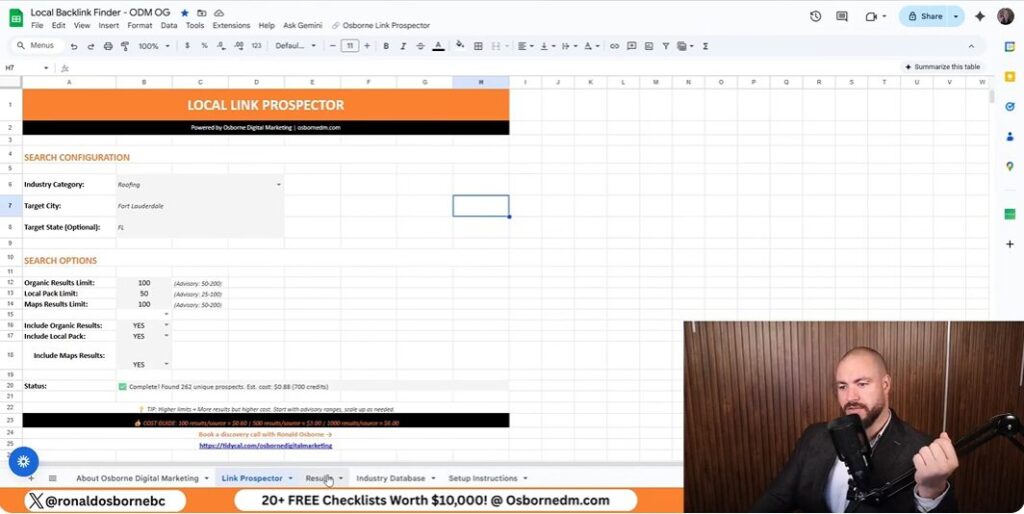
Let’s cut through the noise - most “local SEO backlink” guides will push you toward expensive platforms or generic outreach lists. But here’s my reality: I built 3,200 local backlinks for a roofing client using a Google Sheets-based tool I created, and I did it for less than a buck per 230 unique prospects. No shortcuts, no spammy tactics - just pure prospecting, relationship-building, and a method I’ve refined over years of ranking for terms like “roofing SEO” and “carpet cleaning SEO.”
Here’s the first lesson: don’t waste your time blasting emails to direct competitors. They’ll ignore you, and honestly, why would they help? Instead, I focus on related trades - think plumbers, HVAC companies, local blogs, or even Chambers of Commerce in your city. These businesses aren’t competing for the exact same customers, but they share your local audience and understand the value of cross-promotion. For example, if you’re a roofer in Fort Lauderdale, reaching out to a local plumber or a home improvement blogger can open doors to genuine, relevant backlinks.
When you’re entering search terms into the Osborne Link Prospector, always capitalize city names and use state abbreviations. Trust me, this tiny detail will save you hours when you’re sorting through your outreach list at 4am. For instance, use “Miami FL” instead of “miami fl” or “miami Florida.” It keeps your data clean and your prospecting efficient.
For example, my last run pulled 230 unique local link prospects for just $0.88. That’s less than a cup of coffee, and Data For SEO even gives you a $1 credit when you sign up - so your first campaign could be free.
Not every prospect will have an email address ready to go. At first, this was a pain point. But I learned to compensate by focusing on relationship-building with non-competitors. Sometimes, a quick call or a LinkedIn message to a local business owner can lead to a backlink and a new business connection. And if you join my community, I offer an enhanced sheet with automated email extraction - saving you even more time.
“The secret sauce isn’t just the tool - it’s reaching out to the right people, in the right way, and building real local relationships.”
With this approach, you’re not just chasing links - you’re building a local network that can pay off in rankings, referrals, and long-term partnerships.
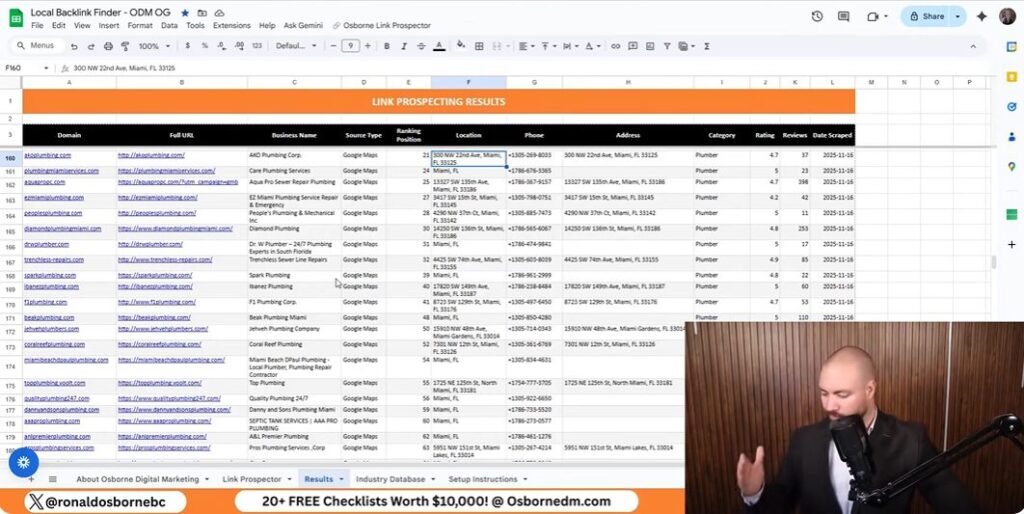
If there’s one thing I’ve learned after years of exploring how to build local SEO backlinks for roofers, it’s this: outreach is not a numbers game. Forget the days of blasting out generic emails to every business in your city. Real results come from building genuine relationships - sometimes in the most unexpected places.
When I first started, I made the classic mistake of treating outreach like a spreadsheet exercise. But after seeing low response rates and even lower link quality, I changed my approach. Now, I focus on industry forums, local business groups, and even friendly rivals as my main channels. These aren’t just sources for links - they’re doors to real conversations and collaborations.
Many roofers worry about reaching out to other contractors or adjacent trades. But here’s a secret: your competitors aren’t always your enemies. In fact, some of my best backlinks came from related businesses.
Real story: I once struck up a casual chat with a local plumber at a networking breakfast. We swapped stories about tricky clients, and I mentioned my client’s roofing blog. A week later, that plumber featured my roofer’s article on his own blog, complete with a juicy backlink. All it took was a friendly conversation - no hard sell, no awkward pitch.
Sometimes, the best links come from thinking outside the box. I’ve bartered small favors - like helping a local HVAC company set up their Google My Business profile - in exchange for a mention on their resources page. I’ve even been a guest on a regional podcast, which not only boosted my client’s authority but also landed a high-trust backlink from the show’s website.
Some of my longest-lasting digital partnerships began offline. Community events, charity drives, and even local sports leagues have introduced me to business owners who later became link partners. The key is to show up, be helpful, and let the relationship grow naturally. When you focus on mutual benefit instead of just your own gain, the backlinks - and the business - follow.
Let’s get straight to the facts: local SEO link building doesn’t have to be expensive, complicated, or reserved for agencies with deep pockets. With the right tools and a smart approach, you can generate hundreds of high-quality local leads for less than the price of a cup of coffee. I’ve proven this time and again - most recently by building 3,200 local SEO backlinks for a roofing client, all tracked and managed using my Google Sheets-based prospecting tool. Here’s how the numbers break down, and why simplicity and relevance always win in local SEO.
When I ran my prospecting tool for “roofer” in Fort Lauderdale, I pulled 230 unique, hyper-relevant local link prospects. The cost? Just $0.88. That’s not a typo. Thanks to the Data For SEO API integration, you pay only for what you use - no monthly subscriptions, no hidden fees. And with a $1 sign-up credit (often more if you use my link), your first round of outreach could be entirely free. For most local businesses, you’ll never need more than a few hundred prospects to see a real impact in your rankings.
In my largest project, I generated 3,200 backlinks for a single client. But here’s the truth: you don’t need thousands of links to break into the Local Pack. In most cities, landing just a handful of high-quality, locally relevant backlinks can move the needle. My tool lets you target 100-200 prospects at a time for manageability, but you can scale up to 1,000 if you want to go big. The process is simple - enter your industry and city, hit the button, and let the sheet do the heavy lifting.
Forget about paying $99+ per month for agency-level platforms. My method is built on Google Sheets, making it accessible, transparent, and easy to use. You control your costs, your data, and your outreach - no tech headaches or steep learning curves. Plus, you get both organic and Google Maps-based prospects, giving you a broader, more relevant pool of leads than most paid tools offer.
| Action | Leads Generated | Cost | Recommended Range |
|---|---|---|---|
| Single City Prospecting (e.g., Fort Lauderdale Roofer) | 230 | $0.88 | 100-200 |
| Multi-City/Full Project | 3,200 | $12.25 | 500-1,000 |
| First-Time User (with $1 credit) | Up to 260 | $0 (with credit) | 100-200 |
With these numbers, you can see exactly how affordable and scalable local SEO link building can be when you use the right system. Prospecting doesn’t have to drain your budget - just use the right tools, and let the results speak for themselves.

When it comes to local SEO, there’s no such thing as a flawless system. Even with my Google Sheets-based prospecting tool - responsible for helping me build 3,200 local backlinks for a single roofing client - the process is never perfectly smooth. But that’s part of the journey. The real magic is in embracing the imperfections, learning from them, and using every hiccup as a stepping stone to better results.
Let’s talk about automation. I’m all for using smart tools to save time and scale up - after all, my own link prospector sheet is built for exactly that. But here’s the truth: even with the full automation available inside my community (including automated email extraction and backend processing), nothing beats a hand-written, personalized outreach email. Automation gets you the list, but relationships are built on authenticity. I’ve seen time and again that a genuine, thoughtful message outperforms any boilerplate template. So, don’t be afraid to automate the grunt work, but always keep a personal touch in your outreach.
One common hurdle with free tools is missing contact information. If the sheet doesn’t pull email addresses, don’t let that slow you down. Instead, get creative. I’ve found huge value in reaching out to hyper-local blogs, tuning into community podcasts, and even suggesting collaborations or interviews. If you’re feeling bold, try hosting a local trivia night or sponsoring a neighborhood event - these “offline” efforts can lead to unique backlinks and real-world relationships that no spreadsheet can deliver.
Perfection is overrated. You’ll hit dead-ends. Sometimes the spreadsheet will glitch, or you’ll get a reply in ALL CAPS at 2 a.m. from someone who thinks SEO is a scam. That’s okay. Laugh it off, learn from it, and keep moving forward. The unpredictability is what keeps this work interesting - and often, those unexpected moments lead to the best connections.
As you scale your local SEO efforts, don’t limit yourself to the obvious. Non-traditional sources like local business directories, sponsorships, or even partnerships with local schools and charities can be goldmines for backlinks and brand exposure. The landscape is always evolving, and the most successful strategies are the ones that blend online automation with offline relationship-building.
In the end, the imperfect art of local SEO backlinking is about balance. Use tools like my link prospector to work smarter, not harder. But remember: the real wins come from human connection, creative thinking, and a willingness to try new things - even if thy seem a little wild at first. If you’re ready to take your local SEO to the next level, don’t hesitate to reach out. I’m always here to help you navigate how to build local SEO backlinks.
