Confession time: I never set out to build what some are now calling a 'cheat code' for anchor text optimization. It all started with a spreadsheet, way too many URLs, and a stubborn curiosity about how AI could actually make my link-building life easier without getting me into hot water with Google. If you’ve ever found yourself staring down a monstrous list of URLs wondering what creative (or disastrous) anchor text to dream up next, you’re not alone. Here’s my hands-on journey in learning how to optimize SEO anchor text with AI - flaws, facepalms, and forehead slaps included.
TL;DR: You don’t have to be a spreadsheet wizard or an AI guru to whip up unique, SEO-optimized anchor texts for hundreds of URLs. By mixing automation, a few human sanity checks, and lessons from the trenches, you can supercharge your link-building - without triggering Penguin penalties or sounding like a robot. Grab my free sheet, avoid classic traps, and always remember: diversify those anchors!
Let’s get one thing straight: anchor text isn’t just some SEO trick to game Google. It’s a fundamental part of how both people and search engines understand what a page is about. When you see a link like “best plumbing services in Miami” versus just “click here”, you instantly know what to expect when you click. Google works the same way - it uses anchor text as a signal to figure out what the linked page is about and how it should rank in search results.
Back in the early days of SEO, anchor text was abused left and right. People stuffed exact-match keywords into every link, thinking it would rocket their sites to the top. For a while, it worked - until Google’s Penguin update came along and changed the game. Suddenly, sites with spammy, repetitive anchor text profiles got hammered. I remember those days well, and trust me, it wasn’t pretty.
I’ll never forget the campaign where I learned this lesson the hard way. I was running a backlink campaign for a local business, and I got a little too aggressive with my anchor text. Every link used the same keyword, and I thought I was being clever. Instead, the site tanked in the rankings almost overnight. That was my wake-up call: anchor text isn’t just about pleasing algorithms - it’s about balance and relevance.
These days, my approach is simple: optimize anchor text for people first, but don’t ignore what Google wants. That’s why I built my AI-powered spreadsheet tool. It generates anchor text that’s both relevant and natural, avoiding the old pitfalls of keyword stuffing. The tool even distinguishes between similar services - like drain cleaning versus drain repair - so you don’t end up confusing Google or your visitors.
Remember, anchor text is a signal, not a shortcut. When you use it thoughtfully, you help both users and search engines understand your content. That’s the real secret to sustainable SEO - and to keeping your sanity in the process.
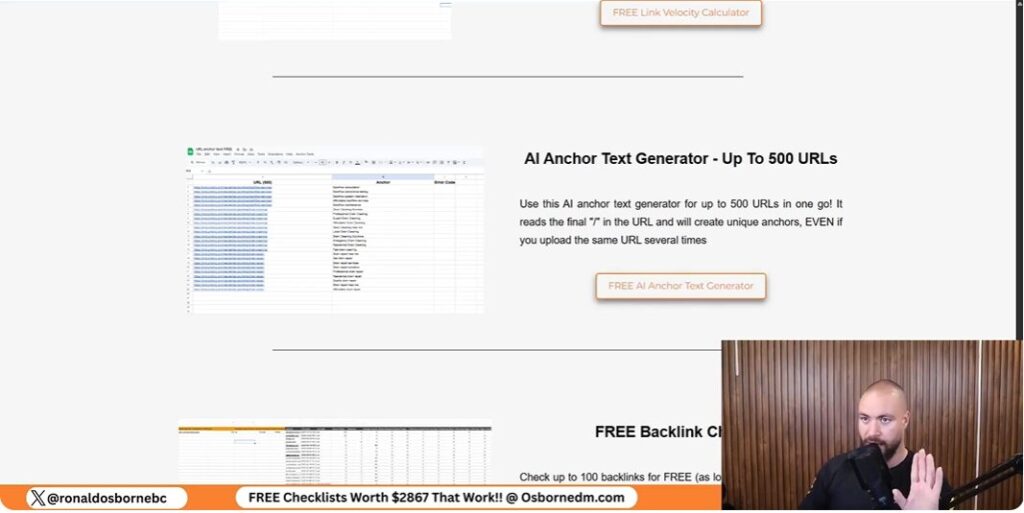
If you’ve ever managed SEO for multiple pages, you know the pain: endless lists of URLs, each needing unique, relevant anchor text. I used to spend hours brainstorming anchors, only to end up with repetitive or off-topic phrases. Worse, I’d sometimes mix up services - like using “drain cleaning” anchors for a “drain repair” page. It was a mess, and it made scaling campaigns nearly impossible.
That frustration pushed me to automate the process. I wanted a tool that could handle hundreds of URLs, generate targeted anchor text, and adapt to different services and locations - without me losing my mind.
So, I built a Google Sheets tool powered by AI. Here’s what it does:
Getting started is simple. All you need is your own OpenAI API key. Here’s how you set it up:
open_API_API_key (exactly as shown).If there’s an issue with your API connection, the tool gives you an error code so you can troubleshoot quickly.
No tool is perfect, and automation comes with quirks. The AI is smart, but if your URLs are too generic - like “Palm Beach County services” - the anchor text might not be spot-on. The script tries to check the homepage for extra clues, but it’s not always precise. For best results, use specific URLs (e.g., “roofing services Palm Beach County”).
In my tests, the tool got it right about 80% of the time (four out of five cases). For most local SEO campaigns, that’s more than enough, especially when you need hundreds of unique anchors. Just make sure you don’t have duplicate URLs before you run the sheet.
Remember: while AI-generated anchor text is fast and scalable, it might not have the subtlety of hand-written copy. Still, for bulk campaigns, this free tool is a game-changer.
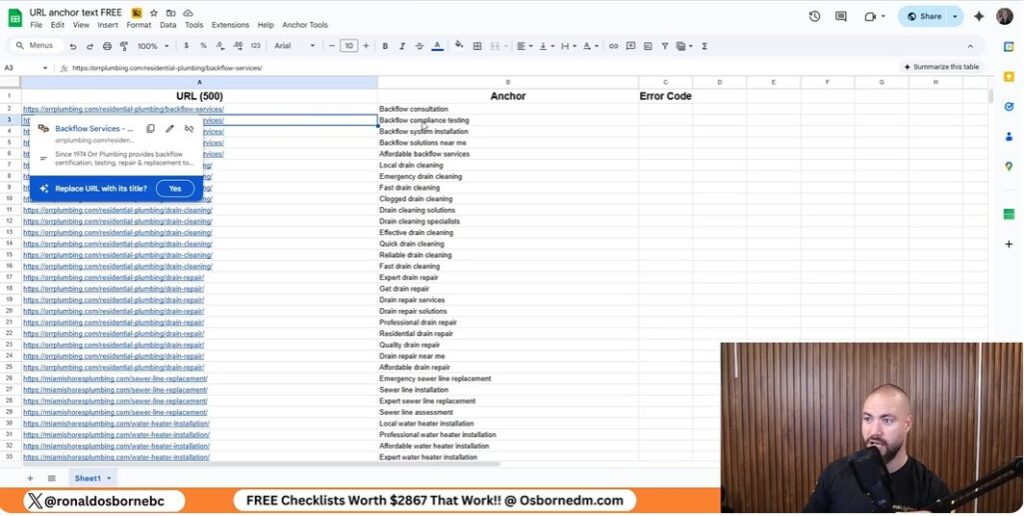
If you’ve ever tried to automate your SEO, you know that anchor text can be both oddly satisfying and a little bit maddening. Before you optimize SEO anchor text with AI, it’s crucial to understand the different types of anchor text - and why they matter. Let’s break down the main types, see real examples from my spreadsheet tool, and talk about why getting them right is so important for your SEO.
Let’s look at how my spreadsheet tool handles different types of pages:
www.miamiplumbing.com/drain-cleaning, the AI generates anchors like drain cleaning Miami or professional drain cleaning.www.miamiplumbing.com/miami, you might see plumbing services Miami or Miami plumbers.www.miamiplumbing.com/blog/how-to-drain-your-pool-safely, expect anchors like how to drain your pool safely or pool draining tips.www.miamiplumbing.com, the tool might default to Miami Plumbing or just the naked URL, especially if your homepage isn’t specific about services.One of the biggest pitfalls is mixing up similar services. For example, using drain repair as anchor text for a drain cleaning page. This confuses Google and your users. My AI tool is engineered to avoid this by analyzing the last part of the URL and matching the anchor text to the actual service. But, if your URL is too generic - like /services - the tool might guess wrong, so always keep your URLs specific.
The AI in my spreadsheet tool isn’t psychic. It prioritizes the final segment of the URL, checks for keywords, and even looks at the homepage for clues if the URL is vague. This works about 80% of the time, but sometimes it’ll generate a generic anchor for a generic URL. That’s why I recommend structuring URLs clearly and reviewing the results before deploying them.
“Anchor text is like seasoning - too much of one type ruins the dish. Mix it up, keep it relevant, and let the AI do the heavy lifting (with a little human oversight).”
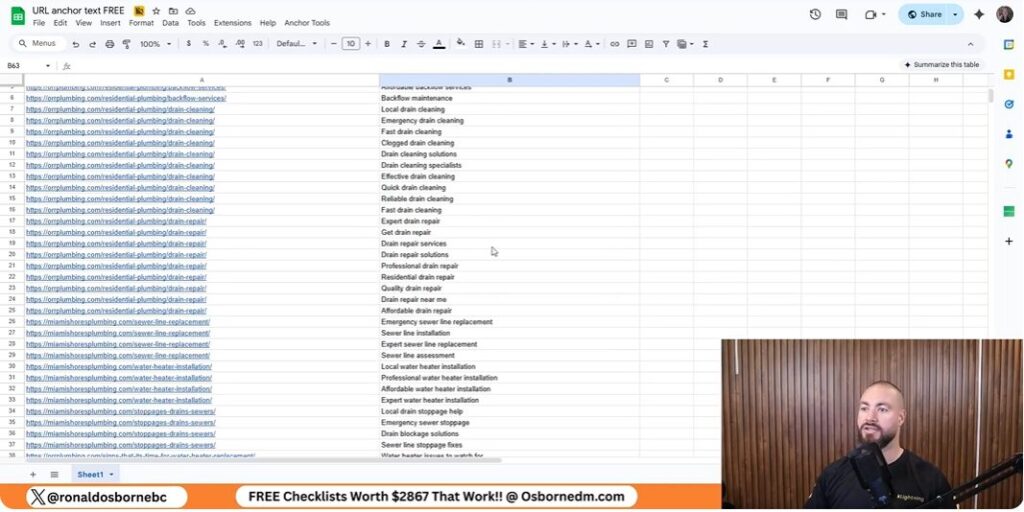
When I first built my AI-powered anchor text spreadsheet, I was honestly blown away by how much time it saved. But as with any tool, there are some surprising benefits - and a few quirks - you should know about before you let the robots take the wheel. Here’s what I’ve learned from using this tool to optimize SEO anchor text with AI on real SEO campaigns, especially for local businesses and service pages.
Let’s start with the obvious: speed. With my spreadsheet, you can drop in a list of 100 URLs and have optimized anchor text for every single one in just a couple of minutes. Even if you max out the tool with 500 URLs, you’re looking at about five minutes, tops. No human can match that pace - not even close. If you’ve ever tried to write unique anchors for hundreds of backlinks by hand, you know it’s a soul-crushing task. AI makes it painless.
It’s not just about speed - it’s about volume. The tool generates unique anchor text every single time, even if you use duplicate URLs. That means you can build out massive backlink campaigns without worrying about repetitive anchor text, which is a huge plus for natural link profiles. For most local or small business campaigns, you’ll never need more than what this tool can produce.
This AI approach is especially effective for local SEO. The spreadsheet is designed to handle geo-specific pages (like “plumbing Miami” or “roofing Palm Beach County”) and can distinguish between similar services, so you don’t end up with mismatched anchors. For small businesses or agencies managing lots of clients, this is a game-changer. You get fast, relevant anchors that help you scale your outreach without burning out.
Here’s where things get a bit less magical. While the AI is smart, it doesn’t do deep-dive competitor analysis. If you want to reverse-engineer exactly what anchor text your competitors are using - and then one-up them - you’ll still need to do that part manually or use a premium tool. My free sheet focuses on speed and accuracy, not on spying. For most campaigns, that’s fine, but for ultra-competitive niches, human research still rules.
AI is only as good as the data you feed it. If your URLs are generic - think “Palm Beach County services” - the tool might not know if you’re a roofer, a plumber, or a dog walker. It tries to check your homepage for clues, but sometimes the anchor text it generates can be off. That’s why I always recommend using specific, descriptive URLs (like “roofing-services-palm-beach-county”). And yes, sanity checks are not optional. Always scan your anchor list before hitting “send” on your outreach.
Bottom line: AI anchor text generation is a massive time-saver, but you still need to keep an eye on the results - especially if your URLs aren’t crystal clear. For most local SEO campaigns, though, it’s more than enough to keep your sanity intact.
Let’s get down to the real mechanics of anchor text - the numbers, the ratios, and the sanity-saving shortcuts I’ve learned after years of trial, error, and a few close calls with Google’s Penguin update. If you’re using my free anchor text spreadsheet, you’ll want to know not just how to generate anchors, but how to balance them for a natural, penalty-resistant backlink profile. Here’s how I approach anchor distribution, why it matters, and how my tool helps you stay on track.
First, let’s talk about the ideal anchor text mix. In my experience, a healthy backlink profile is like a well-balanced diet: too much of one thing, and you’re asking for trouble. Generally, I aim for something like this:
| Anchor Type | Recommended % | Example |
|---|---|---|
| Branded | 30-40% | “Acme Plumbing Miami” |
| Generic | 20-30% | “Click here”, “Visit site” |
| Exact Match | 10-15% | “drain repair Miami” |
| Partial Match | 10-15% | “Miami drain cleaning services” |
| URL/Naked | 10-15% | “www.acmeplumbing.com/drain-repair” |
This table isn’t gospel, but it’s a solid starting point for most local and small business campaigns. The key is variety. My spreadsheet is designed to help you avoid the biggest anchor text mistake: repetition. Never use the same anchor text twice in your campaign - Google’s algorithms are quick to spot patterns, and nothing screams “unnatural” like a dozen links with identical anchors. The tool randomizes and customizes anchors, even for duplicate URLs, so you’re always covered.
One of the best sanity checks you can do is to periodically export your anchor text list from the sheet and compare it to the table above. If you see too many exact matches or branded anchors, adjust your next batch. The spreadsheet makes this easy by generating unique, context-aware anchors each time, but it’s still up to you to keep an eye on your overall distribution.
Here’s my hard-won tip: when in doubt, go branded or generic. If you’re unsure about what anchor to use, a branded term or a generic phrase is always safer than risking over-optimization. I’ve seen too many sites get hit by Penguin for pushing exact match anchors too hard. Remember, natural profiles are messy - embrace the chaos a little!
In conclusion, the combination of my AI-powered spreadsheet and a smart anchor distribution plan can save you hours and protect your site from penalties. Use the table above as your anchor sanity guide, never repeat anchors, and don’t be afraid to lean on branded or generic terms. With these habits, you’ll keep your SEO both automated and safe - and maybe even find the process a little satisfying too.
Don't sleep on AI. Get familiar with AI and if you need to learn more about AI implementation services jump of and check out the team at Senior Living Mastery. They have some really cool things.
